(*)Leveraged trading involves high risk, and you may lose all of your invested capital.
Please ensure you fully understand the risks involved before trading.
Open a live account with up to 1:2000 leverage
Sign upSign up11.03.2026
Improvements to USOIL Trading Conditions '26
Exness is introducing several changes to USOIL. These changes are being implemented to continuously improve the trading environment.
01.07.2025
Notice of Trading Hours Change (July 2025)
Due to the U.S. Independence Day holiday, certain markets will be closed (or trading hours will be adjusted) from July 3 to July 7.
11.06.2026
With Canadian GDP and German CPI data on the horizon, the market may be looking to gauge the direction of the U.S. dollar
In the U.S. currency market the previous day, mixed signals emerged as the April PCE deflator rose 3.8% year-on-year, while the revised Q1 GDP figure was downgraded to an annualized 1.6% quarter-on-quarter.The U.S. dollar remained firm amid concerns over persistently high inflation, but with fears of an economic slowdown lingering, the dollar/yen pair fluctuated within a range of 159.15 to around 159.65 before closing in the low 159 yen range.On the upside, the 159.60 to 160.00 range is likely to be seen as resistance, while on the downside, the focus will be on whether the pair can hold the 159.00 to 158.80 range. Today, U.S. April wholesale inventories and the May Chicago PMI are scheduled for release, and we will be watching to see if the U.S. dollar’s resilience continues. For European currencies, while the US dollar’s resilience acted as a drag, the euro sought direction against the dollar ahead of key eurozone inflation data. The EUR/USD pair traded within a range of 1.1586 to 1.1644 before closing near 1.1634, continuing to consolidate in the low 1.1600s.Resistance is likely around 1.1650, while support is expected between 1.1600 and 1.1580. Today’s schedule includes French CPI, preliminary German CPI, and remarks by Bank of England (BOE) Governor Bailey, and we will be watching for European currencies’ reaction to these inflation data. Today’s key indicators include the revised Q1 GDP for France at 15:45, April consumer spending, and the May Consumer Price Index (CPI, flash estimate),the Swiss KOF Leading Economic Index for May at 16:00, German unemployment figures and unemployment rate for May at 16:55, remarks by Bank of England (BOE) Governor Bailey at 18:20, details on Japan’s foreign exchange intervention at 19:00, the German Consumer Price Index (CPI, flash estimate) for May at 21:00,21:30 Canada Q1 GDP and March Monthly GDP, U.S. April Wholesale Inventories, and 22:45 U.S. May Chicago PMI. In particular, during New York trading hours, Canadian GDP and the U.S. Chicago PMI are likely to be key drivers, while during European trading hours, German CPI is likely to be a key factor; we will carefully monitor the reaction of the Canadian dollar, U.S. dollar, and euro.


| Symbol | Bid | Ask | Spread | Change | High | Low | Long | Short |
| USDJPY | ||||||||
| EURJPY | ||||||||
| EURUSD | ||||||||
| GBPJPY | ||||||||
| XAUUSD | ||||||||
| BTCUSD |
| Symbol | Bid | Ask | Spread | Change | High | Low | Long | Short |
| USDJPY | ||||||||
| EURJPY | ||||||||
| EURUSD | ||||||||
| GBPJPY | ||||||||
| XAUUSD | ||||||||
| BTCUSD |
| Symbol | Bid | Ask | Spread | Change | High | Low | Long | Short |
| USDJPY | ||||||||
| EURJPY | ||||||||
| EURUSD | ||||||||
| GBPJPY | ||||||||
| XAUUSD | ||||||||
| BTCUSD |
| Symbol | Bid | Ask | Spread | Change | High | Low | Long | Short |
| USDJPY | ||||||||
| EURJPY | ||||||||
| EURUSD | ||||||||
| GBPJPY | ||||||||
| XAUUSD | ||||||||
| BTCUSD |
Exness offers trading conditions focused on high-leverage trading, enabling traders to generate significant profits with minimal capital. With a maximum leverage of 2,000:1 (*1) and a 0% margin call level, traders can fully utilize their available margin.

At Exness, you can use leverage of up to 2,000:1 on all account types. With Exness, you can take advantage of high leverage to engage in dynamic trading even with a small amount of capital (*1).

At Exness, you can trade a wide range of attractive instruments—including major and minor FX pairs, cryptocurrencies, and gold (XAUUSD)—with no swap charges. This allows you to trade over the medium to long term without worrying about your funds being eroded by negative swaps.
At Exness, stop-out will not be triggered until the margin maintenance level reaches 0% for all account types. This allows traders to make the most of their available funds.
Exness minimizes trading costs (spreads and commissions) to the lowest possible level and offers trading conditions that are ideal for scalping. The company has removed position limits across all account types, creating an environment that accommodates high-volume traders.

Exness offers spreads and trading fees below the industry average across all of its low-spread account types. Traders can choose from a variety of account specifications—including commission-free, variable commission, and fixed commission options—to suit their trading style.

Exness not only offers low spreads, but also provides reliable, stable spreads even during periods of high price volatility (*1). By keeping trading costs low, this helps increase profits from scalping trades.
Exness offers a flexible trading environment with no restrictions on trading strategies or position limits, allowing you to engage in scalping using a variety of methods. Exness also provides favorable trading conditions for high-volume traders.

Exness is an international FX broker that holds multiple licenses from reputable financial regulatory authorities around the world. These licenses demonstrate Exness’s commitment to transparency, secure operations, and providing a reliable trading environment. Exness discloses information appropriately in accordance with the guidelines of each country’s regulatory authorities.
Exness offers five account types tailored to different trading styles and skill levels, ensuring satisfaction for a wide range of clients—from first-time forex traders to seasoned professionals.In addition to the standard Standard account, you can choose from five account types: the Standard Cent account for beginners who want to start live trading with small amounts while minimizing risk; the Low Spread account for intermediate and advanced traders who want to trade with low spreads; the Pro account; and the Zero account, which eliminates spreads for the top 30 instruments.

Exness offers a wide range of convenient deposit and withdrawal methods designed to meet the needs of traders worldwide. Additionally, Exness supports approximately 64 currencies, including the Japanese yen, U.S. dollar, euro, British pound, and Australian dollar, so you don’t have to worry about exchange rate losses when making deposits or withdrawals.
All deposit and withdrawal transactions are processed in real time, and there are no fees whatsoever.

You can deposit funds into your trading account using your credit or debit card. Exness accepts VISA and Mastercard.

You can deposit funds into your trading account using online wallets such as Neteller and Skrill.
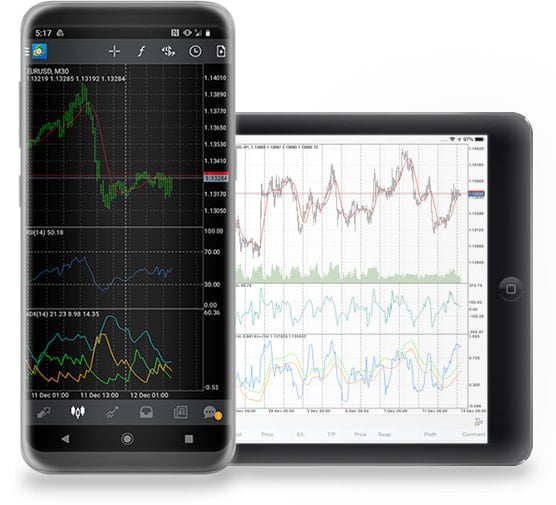
Android OS 5.0 and iOS 12.0 or later. Compatible with iPhone, iPad, and iPod touch

<Android>

<iPhone>

<iPad>
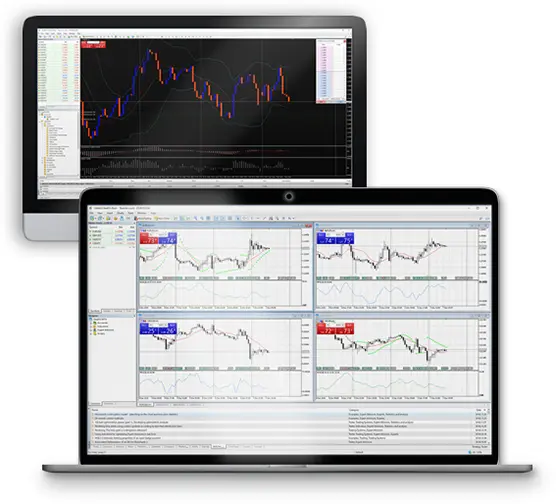
| App: | Compatible with Windows 7 and later, and macOS 10.12 and later |
| Website: | Compatible with Chrome, Firefox, Safari, and other popular browsers |

<Windows>

<Mac>

<Web>
With Exness, you can open a live trading account with just a few simple online steps. The Exness Personal Area is a dedicated page for clients to manage their account information and process deposits and withdrawals. New clients should first register for the Personal Area, proceed to phone verification via the secure page within the area, and enter their personal information.At Exness, upon registering for the Personal Area, both an MT5 Standard account and a demo account will be opened automatically. After that, the live trading account opening process is completed following the verification of various documents.
The Exness Group is a financial brokerage firm established in 2008 by a group of like-minded experts in the fields of finance and information technology. The Exness Group has achieved remarkable growth over the past few years and is now recognized as an industry leader.
Exness is constantly striving to improve, offering new opportunities to explore the financial markets and support from financial professionals, while precisely meeting a wide range of trading needs.


If you're using iOS

If you're using iOS, tap the "Add to Home Screen" icon at the bottom of Safari and select "Add to Home Screen." Once you've added it to your Home Screen, you can turn on "Receive Push Notifications" as shown above.
If you are using an Android device or a PC
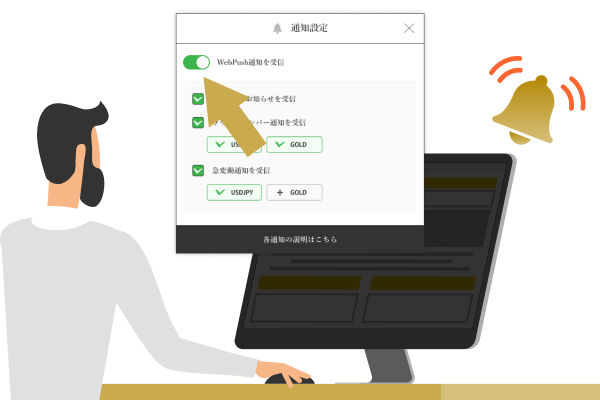
If you're using an Android device or a PC, you can simply turn on "Receive push notifications" above without installing the app. (If your browser asks for permission, please select "Allow.")
You can find instructions on how to add this to your smartphone's home screen below.


You will receive notifications about key metrics and limited-time promotions. If you turn this feature off, you may not be able to participate in limited-time promotions.
A feature that sends notifications when a price reaches a round number. These notifications help traders identify trading opportunities and manage risk, making them a popular tool among many traders.

Notifications are sent for every 100 pips (1 JPY) (e.g., $1 = 147 JPY, $1 = 148 JPY, etc.). Notifications for the same exchange rate are reset after 3 days (72 hours).
Notifications are sent every 500 pips (50 USD) (e.g., $3,000, $3,050, etc.). Notifications for the same rate are reset after 3 days (72 hours).
Notifications are sent every $5,000 (e.g., $110,000, $115,000, etc.). Notifications for the same rate are reset after 3 days (72 hours).
Receive real-time notifications on price movements for USD/JPY, gold, and Bitcoin. Never miss a trading opportunity, even when you're on the go, and place orders instantly in response to market conditions.
You will receive a notification when there is a price fluctuation of 30 pips (0.3 JPY) or more within a 10-minute period (sharp rise or fall). After that, notifications for sudden price fluctuations under the same conditions will be suspended for one hour.
You will receive a notification when the price fluctuates by more than $20 within an hour (sharp rise or fall). After that, notifications for sudden price fluctuations under the same conditions will be paused for 4 hours.
You will receive a notification when the price fluctuates by more than $2,000 within an hour (sharp rise or fall). After that, notifications for sudden price fluctuations under the same conditions will be paused for 4 hours.