














Exness's Zero Cut System
Transaction
Exness's Zero Cut System
Exness employs a zero-cut system (negative balance protection), which means that if your losses exceed your account balance, Exness will cover the difference and reset your balance to zero.Exness offers a “0% stop-out level”—a feature rare in the industry—allowing you to trade while maximizing the potential of your margin. However, if a forced liquidation is delayed by even a few seconds due to an unexpected sharp rise or fall in prices, your account balance could become negative.Exness’s Zero Cut System is a crucial mechanism that protects traders’ funds in such situations. With Exness’s Zero Cut System, even if losses occur, you will never incur debt exceeding your deposited funds, so even beginners can enjoy Exness’s unique high-leverage trading with peace of mind.
Exness's Zero Cut System
At Exness, we employ a zero-cut system across all account types and all tradable instruments. Since Exness covers any negative balance, you can trade with reduced risk of loss. Please review the features of Exness’s zero-cut system and enjoy a comfortable trading experience.
What Is Exness's Zero Cut System?
Exness’s Zero Cut System is a mechanism that resets your account balance to zero when losses exceed your account balance due to sudden market fluctuations. Since Exness covers the negative balance, you are not required to pay a margin call (additional margin).
At Exness, we provide an excellent trading environment—including “low spreads” and “up to 2,000x leverage” (*)—to protect your funds to the greatest extent possible. However, in the event of sudden market fluctuations, a stop-out may not occur in time, potentially resulting in a negative account balance.In such situations, Exness’s Zero Cut System limits traders’ losses to their account balance (margin). Since you will never incur liabilities exceeding the amount you have deposited, even beginners can trade with peace of mind. For Exness, which offers “up to 2,000x leverage,” the Zero Cut System is an indispensable feature.
(*) Leveraged trading involves high risk, and you may lose all of your invested capital. Please ensure you fully understand the risks before trading.
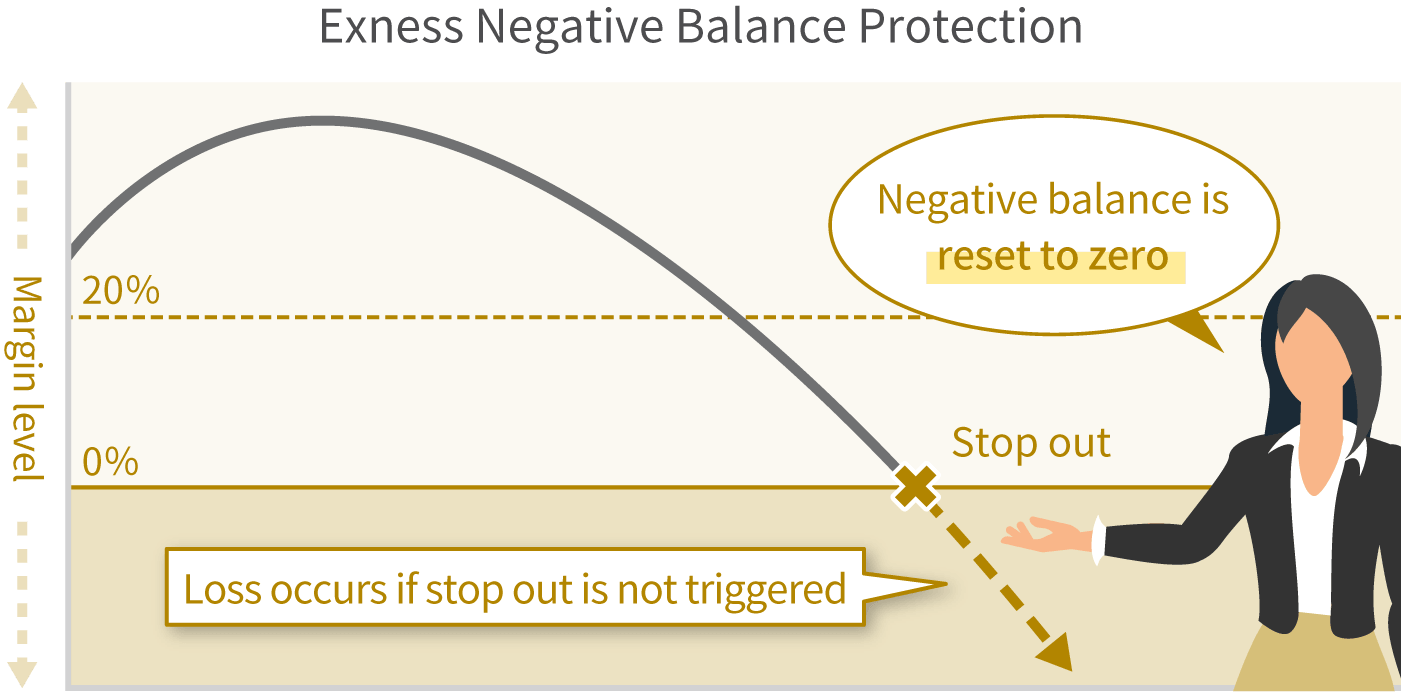

"Oishō" is an abbreviation for "additional margin" and refers to the shortfall that must be paid to an FX broker when losses exceed the account balance. The services and systems provided by FX brokers depend heavily on regulations set by financial authorities and other regulatory bodies in their respective jurisdictions.For example, FX brokers based in Japan are prohibited by law from covering clients’ losses, so they cannot implement a zero-cut system. As a result, if a negative balance occurs, you must make an additional deposit to cover the margin call. Exness employs a zero-cut system with no margin calls, so margin calls do not occur.Please rest assured that you will never incur losses exceeding your deposited amount.
Exness's 0% Stop-Out Level
At Exness, a “stop-out” is triggered when the margin maintenance ratio falls below 0%.Also known as a “stop-out,” a stop-out is a loss protection system that forcibly closes positions when the margin maintenance ratio of a trading account falls below a certain level. While many brokers set their stop-out levels between 20% and 100% of the margin maintenance ratio, Exness—unlike most in the industry—has set its stop-out level at 0%.With Exness’s 0% stop-out level, you can continue trading until the margin in your account is completely depleted. When a stop-out occurs, even positions that might have generated a profit if held longer are forcibly closed. Therefore, the “0% stop-out level,” which allows you to trade while maximizing the potential of your margin, is a significant advantage.
Additionally, at Exness, if your maintenance margin ratio falls below 30% (60% for Standard and Standard Cent accounts), we will notify you of the decline via a “margin call.”At Exness, when a margin call is triggered, positions are not forcibly closed, and no additional deposit is required. When a margin call is triggered, please check your current account balance and take steps such as closing positions or making an additional deposit to ensure you have sufficient margin before continuing to trade.
Exness Margin Call and Stop-Out Thresholds
| Account Type | Margin Call | Stop-Loss |
| Standard Account | Maintenance Margin Ratio: 60% | Margin Maintenance Ratio: 0% |
| Standard Cent Account | ||
| Low-Spread Account | Maintenance Margin Ratio: 30% | |
| Pro Account | ||
| Zero Account |
| Standard Account | |
| Margin Call | Maintenance Margin Ratio: 60% |
| Stop-Loss | Margin Maintenance Ratio: 0% |
| Standard Cent Account | |
| Margin Call | Maintenance Margin Ratio: 60% |
| Stop-Loss | Margin Maintenance Ratio: 0% |
| Low-Spread Account | |
| Margin Call | Maintenance Margin Ratio: 30% |
| Stop-Loss | Margin Maintenance Ratio: 0% |
| Pro Account | |
| Margin Call | Maintenance Margin Ratio: 30% |
| Stop-Loss | Margin Maintenance Ratio: 0% |
| Zero Account | |
| Margin Call | Maintenance Margin Ratio: 30% |
| Stop-Loss | Margin Maintenance Ratio: 0% |
Why Exness Uses a Zero-Cut System
At Exness, as part of our efforts to build sustainable, long-term relationships with our traders, we have implemented a zero-cut system to provide maximum protection for our clients’ funds.To minimize the risk of loss as much as possible, we have implemented a system that ensures you will never incur debt even if your account balance goes negative, allowing you to trade with peace of mind. Please enjoy trading while minimizing risk with the Zero Cut System, and take full advantage of Exness’s unique high leverage of up to 2,000x (*) and industry-leading tight spreads.
(*) Leveraged trading involves high risk, and you may lose all of your invested capital. Please ensure you fully understand the risks before trading.
Rules of Exness's Zero Cut System
Please review the timing and rules for when the zero-cut system is triggered at Exness.
Timing of Exness's Zero Cut Execution
Exness’s zero-cut system is automatically triggered when your account balance turns negative due to sudden market fluctuations. With some FX brokers, the zero-cut is not executed immediately after the balance turns negative; instead, it may require time for review by the relevant department or necessitate an additional deposit.However, at Exness, the zero-cut is automatically triggered as soon as your balance goes negative, helping you avoid missing out on trading opportunities. Once your account balance has been reset to zero, please deposit funds into your trading account and resume trading using those funds.
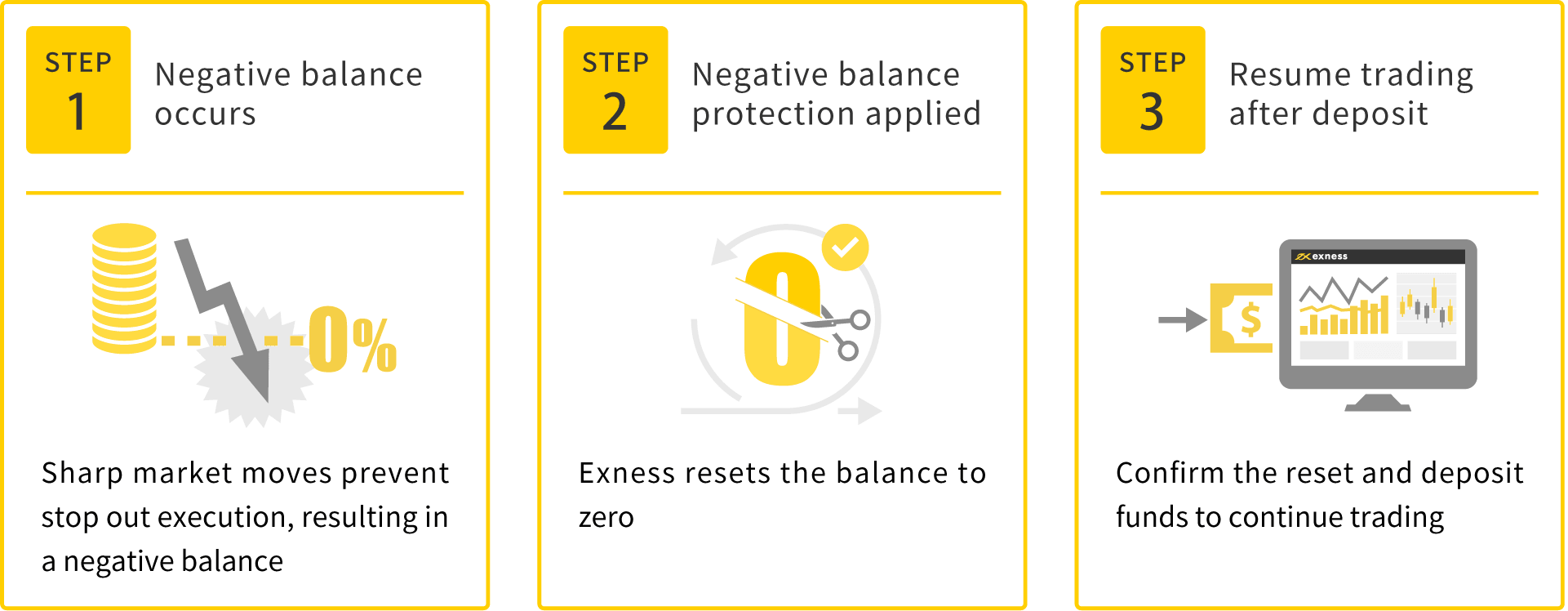
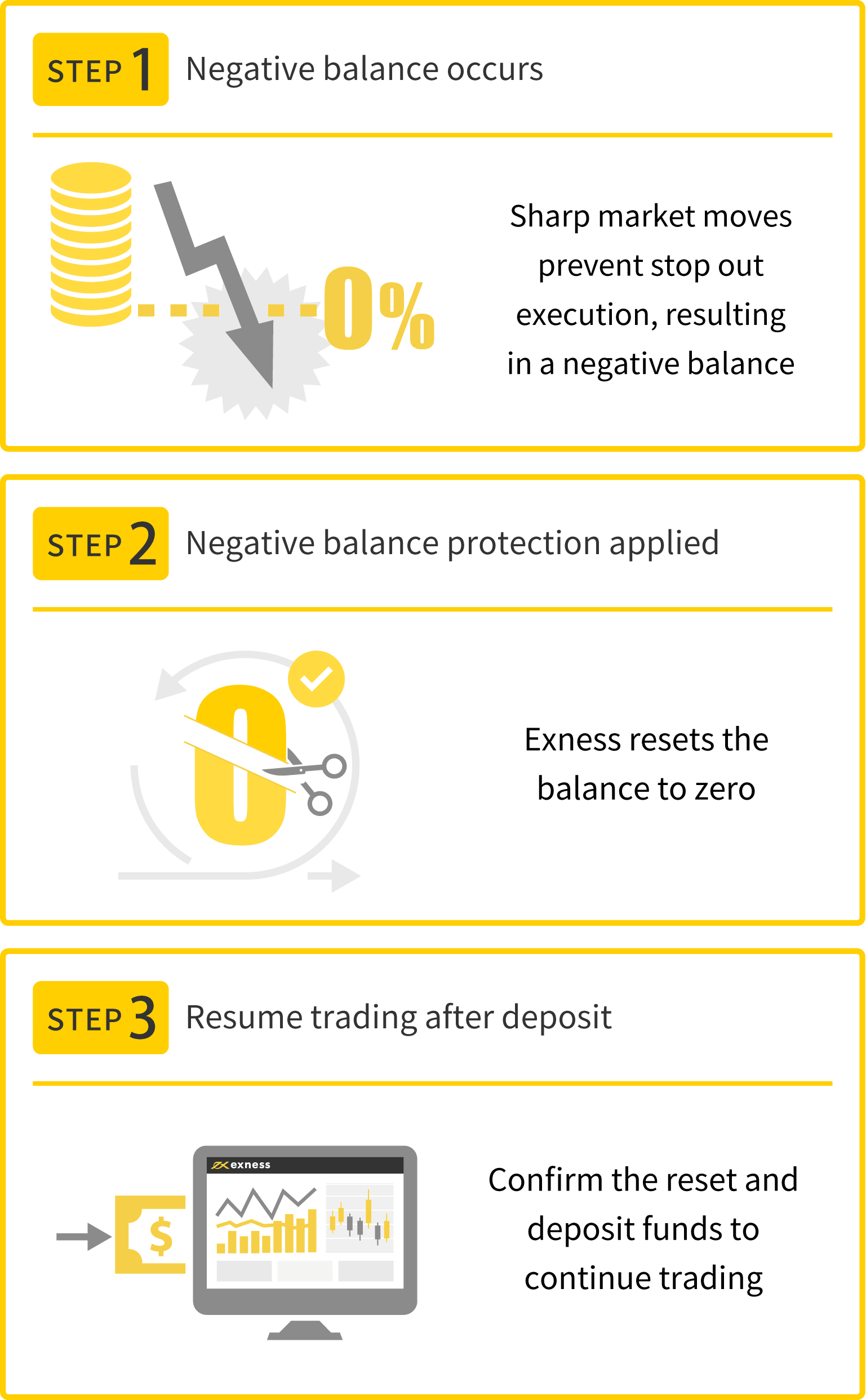
Please note that if you make an additional deposit into an account with a negative balance resulting from open positions before Exness has issued a reimbursement, the zero-cut policy will not be enforced. If the negative balance is deducted from your deposit, please contact the Exness Support Desk.

Exness's Zero Cut System is available for all account types and all instruments
Exness’s Zero Cut System applies to all account types and all tradable instruments offered by Exness. Furthermore, there is no upper limit on the negative balance covered by the Zero Cut System. No matter how large your losses may become, your negative balance will be reset to zero as long as you have no open positions. Please rest assured that there is also no limit on the number of times the Zero Cut System can be triggered.
Exness's zero-cut policy is applied on a per-account basis
Exness’s Zero Cut policy is applied on a per-account basis. Therefore, please rest assured that even if there is a positive balance in one account within the same account group, those funds will not be used to cover a negative balance in another account. Exness will cover any negative balances in each account and reset the balance to zero.
At Exness, even if you are hedging across multiple accounts, a negative balance will still be subject to the zero-cut policy.Generally, many FX brokers prohibit hedging across multiple accounts, and if you do so, you will almost always face penalties such as exclusion from the zero-cut policy or withdrawal denial. However, since Exness officially allows hedging across multiple accounts, you can not only freely utilize hedging strategies to trade flexibly but also mitigate loss risk through the zero-cut system.
Risk Management with Exness's Zero Cut System
Exness employs a zero-cut system, which enables comprehensive risk management across all aspects of trading. Precisely because we provide a trading environment that is advantageous to traders—featuring industry-rare benefits such as a “0% stop-out level” and “up to 2,000x leverage” (*)—it is crucial to manage risk using the zero-cut system.
(*) Leveraged trading involves high risk, and you may lose all of your invested capital. Please ensure you fully understand the risks before trading.
Risk Management in a Market Shock
When trading FX or CFDs on Exness, you need to be cautious of irregular market shocks. Looking back at past market events, there have been instances such as “Black Monday” and the “Apple Shock,” which caused many investors to suffer substantial losses, as well as the “COVID Shock,” which is still fresh in our minds.During market shocks, even if you have set stop-loss orders on your open positions, extraordinary and sudden price fluctuations can cause losses to exceed your account balance in a matter of seconds. Trading with Exness, which employs a zero-cut system across all account types and instruments, serves as a risk mitigation measure against such market shocks.
Risk Hedging Against a 0% Stop-Loss Level
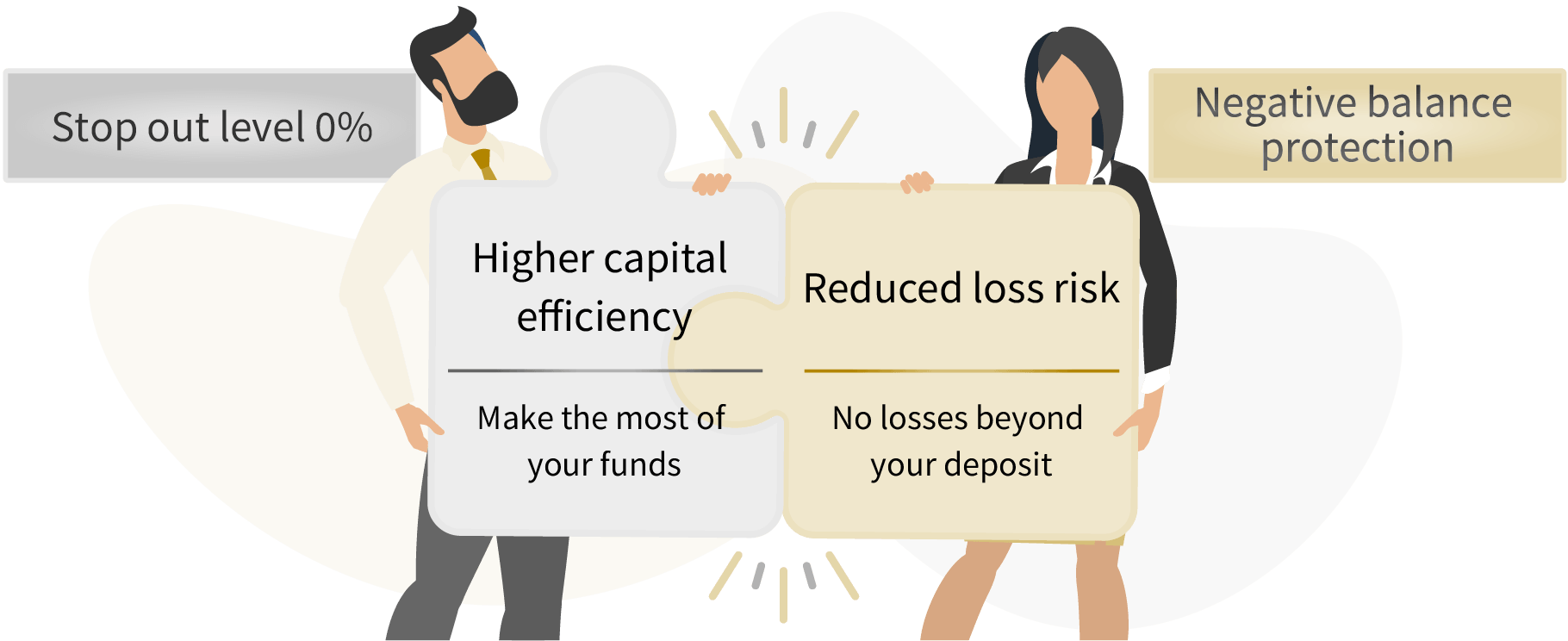
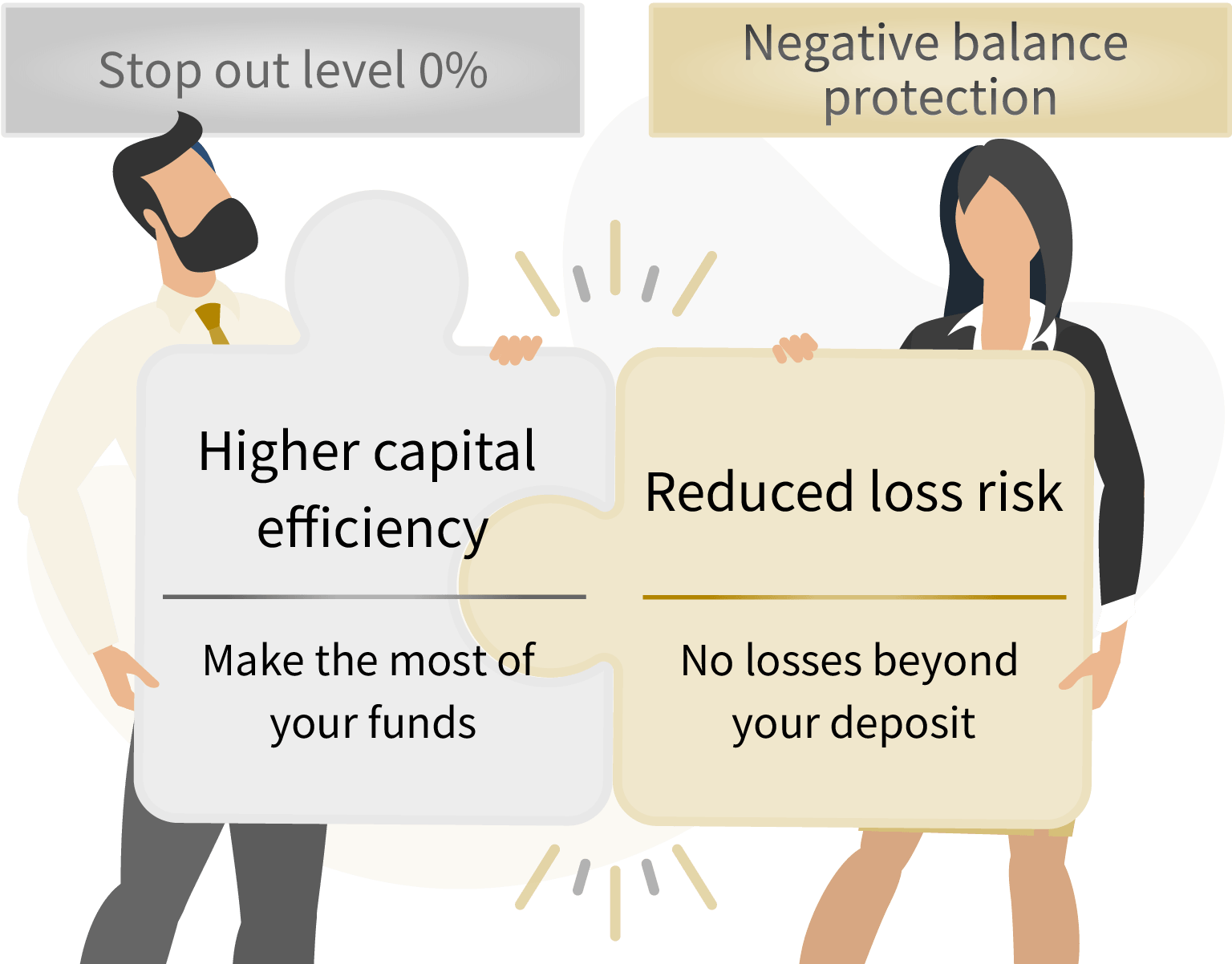
Exness’s Zero Cut System serves as a risk hedge against the “0% stop-out level.” Exness’s 0% stop-out level is rare in the industry; since you can hold positions until your margin is depleted, you can aim for a longer period to capitalize on the chance that a market reversal will turn your losses into profits.While this offers the advantage of maximizing the potential of your margin, even the slightest delay in the stop-out timing can result in significant losses. Exness’s Zero Cut System helps mitigate this risk. Through the combination of a “0% stop-out level” and the “Zero Cut System,” Exness allows you to enhance capital efficiency and minimize the risk of losses.
Risk Hedging Against High Leverage
Exness offers “up to 2,000x leverage” (*), making it possible to trade with amounts ranging from small to large. However, high-leverage trading carries a higher risk of significant losses than regular trading when the market moves in an unexpected direction.Precisely because Exness enables dynamic trading with up to 2,000x leverage, we believe it is crucial to protect our clients’ funds to the greatest extent possible through our Zero Cut System, which helps avoid significant losses during irregular market conditions.For those who want to try high leverage but are concerned about debt in the event of a losing trade, the “Zero Cut System”—which ensures you will never incur debt exceeding your deposit—provides peace of mind as you begin trading.We recommend that beginners start trading with a small amount of capital and make additional deposits once they become more comfortable. Please rest assured that Exness does not profit from your losses.
(*) Leveraged trading involves high risk, and you may lose all of your invested capital. Please ensure you fully understand the risks before trading.
Important Points to Note About Exness's Zero Cut and Stop-Out Policies
Both Exness’s Zero Cut System and stop-out are important mechanisms designed to protect your account balance. Please review the important points regarding Exness’s Zero Cut System and stop-out to ensure a smooth trading experience.
Be mindful of leverage limits
At Exness, leverage of up to 2,000x(*) is available for all account types, allowing for a wide range of trading opportunities. However, Exness imposes leverage restrictions based on your account balance.Therefore, if you generate profits from trading and your account balance exceeds a certain level, your leverage will be restricted, and your required margin will increase. As your required margin increases, your margin maintenance ratio decreases, making you more susceptible to a margin call. Please be mindful of Exness’s leverage restrictions.
In addition, the maximum leverage is limited to 200x around the time of major economic news releases and around market open and close times on weekends. Please check the “Economic Calendar” for the schedule of major economic indicators.Furthermore, Exness will notify you via email in advance whenever leverage restrictions are imposed due to major events or economic indicators, so please check the details.
(*) Leveraged trading involves high risk, and you may lose all of your invested capital. Please ensure you fully understand the risks before trading.
Even if your balance drops to 0 yen, you may not be subject to a margin call right away.
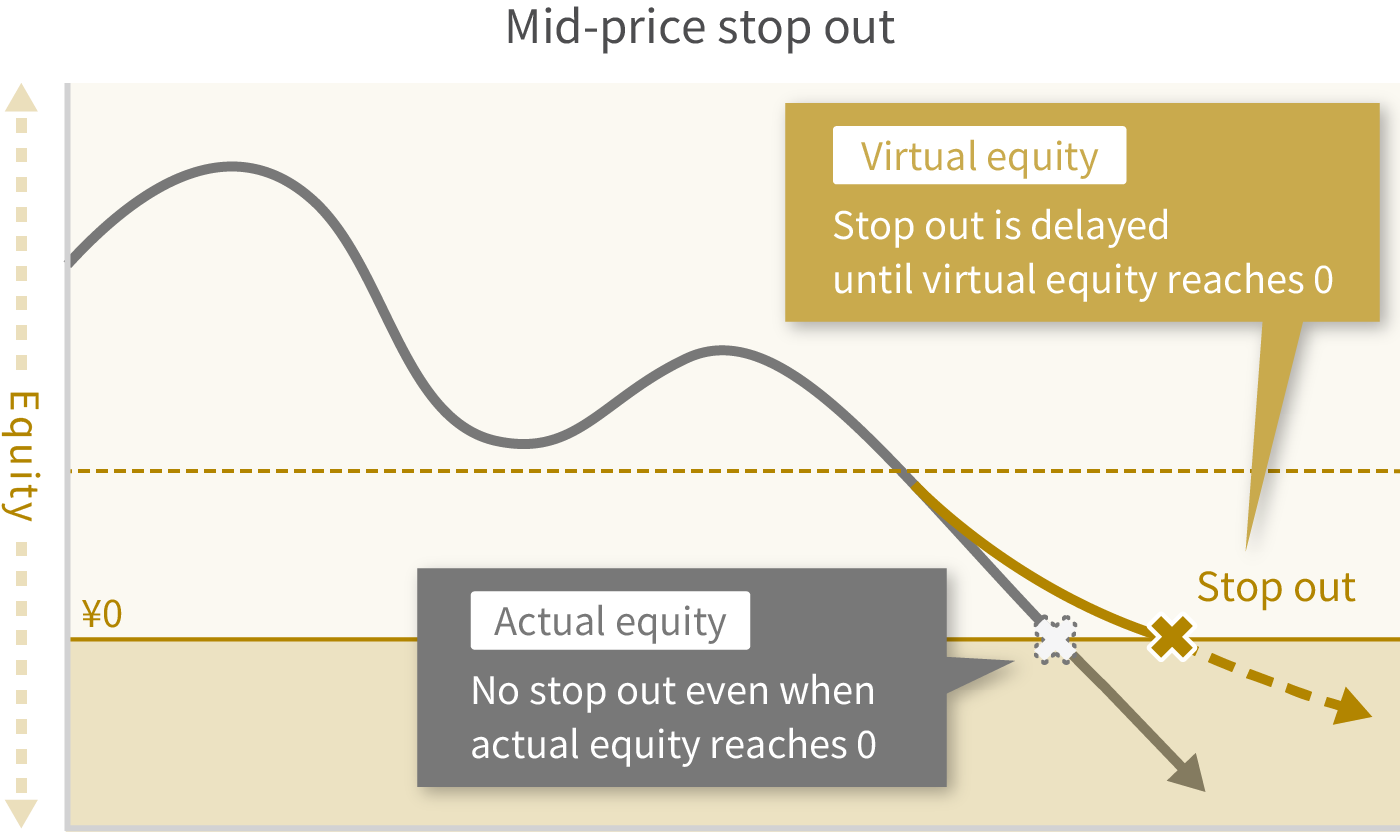
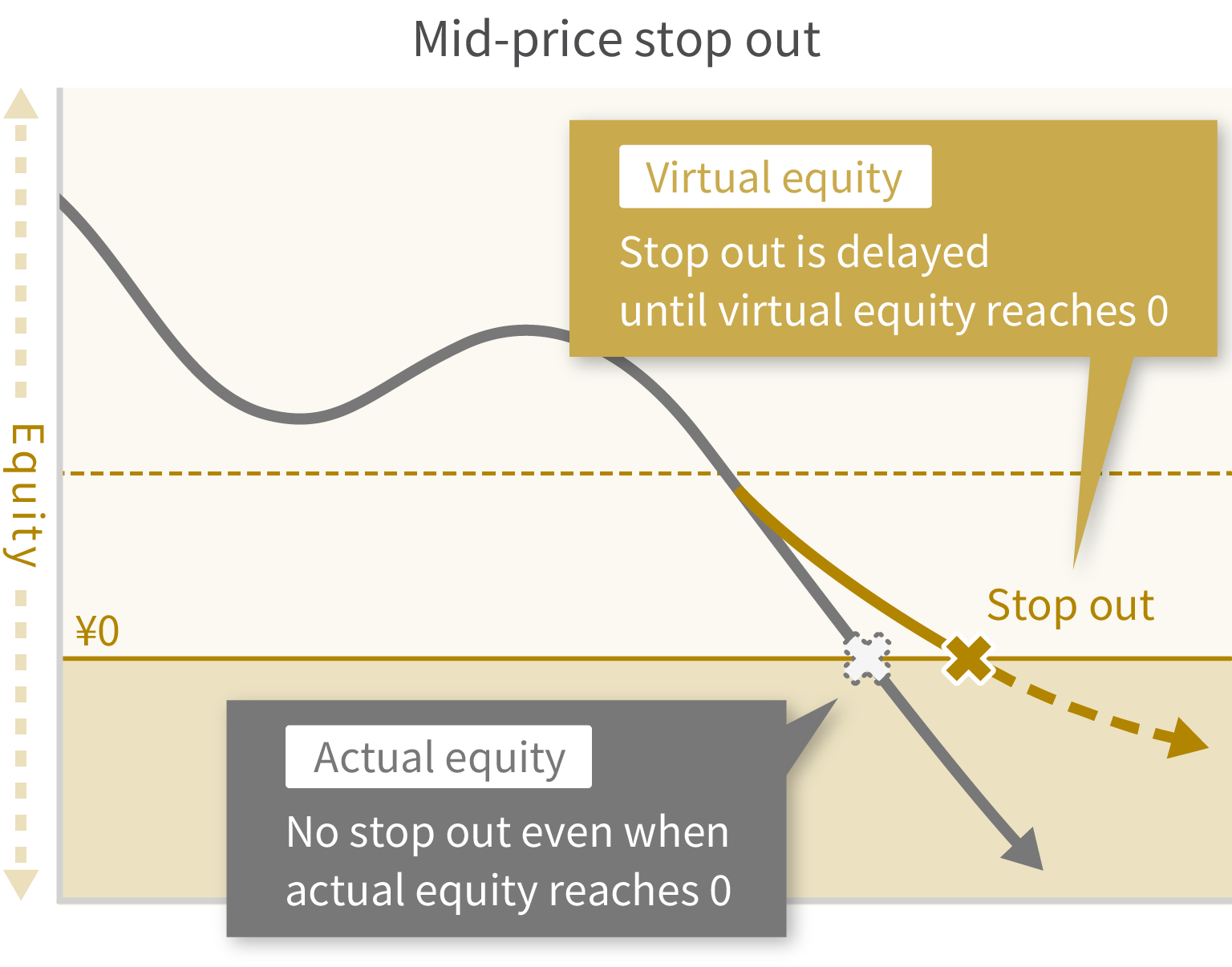
At Exness, we use a “mid-price stop-out determination” system, which means that even if your margin balance reaches 0 yen, a stop-out may not be executed immediately.This is a method unique to Exness. When sudden market fluctuations cause the margin maintenance ratio to approach 0% and a stop-out (forced liquidation) appears imminent, the system halves the spread to make forced liquidation less likely to occur.
At Exness, these spread discounts can delay a forced liquidation. As a result, even if your margin maintenance level and margin balance reach zero, liquidation may not be triggered immediately, and trading may continue while you have a negative balance.The best-case scenario is for the market to reverse and generate a profit. However, even if the position is eventually liquidated and losses exceed your account balance, please rest assured that the zero-cut system will reset your balance to zero.
With Exness’s “Mid-Price Stop-Out,” a “virtual available margin” is set separately from the “actual available margin” displayed in MT4/MT5.Normally, a stop-out is triggered when the “Actual Available Margin” displayed in MT4/MT5 reaches 0 yen. However, with Exness, a stop-out is not triggered until the “Virtual Available Margin”—which takes the spread discount into account—reaches 0 yen.If a stop-out is not triggered even though the “Actual Available Margin” displayed in MT4/MT5 is 0 yen, it is because the “Virtual Available Margin” has not reached 0 yen under the “Stop-out Determination Based on Mid-Price” system.
If you have any open positions, you are not eligible for the zero-cut policy.
Exness’s Zero Cut system is triggered when your account balance goes negative; however, please note that the Zero Cut will not be executed if there are any open positions remaining in the account. At Exness, in the event of a sharp rise or fall in the market, you may end up with a negative balance at the point when a stop-out is executed.If you hold multiple positions, stop-outs will be executed in order of highest profit margin until the maintenance margin ratio exceeds 0%. For example, if you hold three positions and the stop-out of the two most profitable positions brings the maintenance margin ratio above 0%, the third position will not be stop-out, and you can continue trading.However, in this case, even if you have a negative balance, the zero-cut policy will not be enforced unless you close the third position; therefore, please exercise caution when trading multiple positions. If you wish to have your negative balance covered by Exness, please close all open positions.
Frequently Asked Questions (FAQ) About Exness Zero Cut
-
Does Exness apply the zero-cut system to hedging trades across multiple accounts?
Yes, Exness’s Zero Cut System applies even when a negative balance occurs while conducting hedging trades across multiple accounts. Since hedging across multiple accounts is permitted, you can not only trade flexibly using hedging strategies but also mitigate the risk of losses through the Zero Cut System.
Read More
26.09.2023
-
Is Exness's zero-cut system applied on a per-account basis?
Yes, Exness’s Zero Cut System is applied on a per-account basis. Balances in other accounts within the same account will not be used to cover a negative balance in one account. By practicing proper money management, you can enjoy high-return trading while minimizing risk.
Read More
26.09.2023
-
Is there a limit to Exness's zero-cut system?
No, Exness’s Zero Cut system has no upper limit based on amount and no limit on the number of times it can be triggered. Even if your losses become significant, your negative balance will be automatically reset. Even if you encounter multiple situations where Zero Cut is required in succession, it will be executed smoothly, so you can trade with peace of mind.
Read More
26.09.2023
-
Please tell me when the zero-cut policy is enforced at Exness.
At Exness, a zero-cut is automatically executed as soon as your account balance goes negative. No action is required on your part, allowing you to move seamlessly on to your next trade. Once you confirm that your account balance has been reset to zero, you can resume trading immediately by making a deposit or transferring funds from another account.
Read More
26.09.2023
-
Does Exness support the zero-cut system?
Yes, Exness supports the zero-cut system for all account types, and it applies to all tradable instruments. Furthermore, since Exness’s stop-out level is set at a 0% maintenance margin, proper risk management allows you to trade with the goal of achieving significant profits while minimizing risk.
Read More
26.09.2023