














Exness Deposit Methods
Payment Methods
Exness Deposit Methods
The deposit methods available at Exness are credit/debit cards (VISA, Mastercard) and online wallets (Neteller, Skrill) (*). Exness supports a wide range of currencies, including the Japanese yen, U.S. dollar, euro, British pound, and Australian dollar, so you don’t have to worry about exchange rate losses when making deposits.In addition, deposits at Exness are processed in real time without manual intervention, and there are no deposit fees.
(*) Customers residing in Japan are not eligible to use Neteller or Skrill.
List of Deposit Methods Available on Exness ((Current)
Exness currently offers the following deposit methods. (*1)
However, you must complete profile verification before you can make a deposit.

You can deposit funds into your trading account using your credit or debit card. We accept VISA and Mastercard.
Credit Card Details
You can deposit funds from your Neteller account into your Exness trading account. We accept U.S. dollars and euros (*2).
More About Neteller
You can deposit funds from your Skrill account into your Exness trading account. We support U.S. dollars and euros (*2).
More About Skrill- Neteller and Skrill are not available to residents of Japan.
- The currencies accepted by Neteller and Skrill may vary depending on the region where you opened your account. Please check the available currencies on the deposit screen.
Exness Deposit Rules
At Exness, we employ a "segregated account" system, which keeps client funds separate from the company’s assets, and we operate under a strict fund management framework. Please rest assured that we have a robust system in place to properly manage your funds.
When depositing funds into your Exness trading account, please review the terms and conditions for each deposit method as specified by Exness in advance and follow the deposit rules when making your deposit.
Please note that you will not be able to make a deposit if your profile verification (identity verification) has not been completed. Please complete all necessary profile verification (identity verification) procedures before making a deposit.
With Exness, you can deposit funds with no deposit fees.
Exness offers deposit methods with no deposit fees. Since you can avoid unnecessary costs when making deposits, you can manage your trading funds efficiently.
Currencies Accepted and Processing Times by Deposit Method
At Exness, the available currencies and processing times vary depending on the deposit method. If you make a deposit in a currency different from your trading account’s base currency, the amount will be converted to the account’s base currency based on the exchange rate at the time of deposit. Please note that the only deposit method available for Japanese yen is “Credit/Debit Card.”
When you deposit funds using a credit or debit card, the funds are credited to your trading account in real time, 24 hours a day, 365 days a year, allowing you to start trading right away.
| Payment Methods | Currencies Accepted | Processing Time |
 Credit/Debit Cards (*1) Credit/Debit Cards (*1) |
USD | Immediately |
 Neteller (*2) Neteller (*2) |
USD/EUR (*3) | Immediately to 30 minutes |
 Skrill (*2) Skrill (*2) |
USD/EUR (*3) | Immediately to 30 minutes |
| (*1) |
|
| Currencies Accepted | USD |
| Processing Time | Immediately |
| (*2) |
|
| Currencies Accepted | USD/EUR (*3) |
| Processing Time | Immediately to 30 minutes |
| (*2) |
|
| Currencies Accepted | USD/EUR (*3) |
| Processing Time | Immediately to 30 minutes |
- At Exness, VISA and Mastercard are accepted for deposits and withdrawals in USD.
- Neteller and Skrill are not available to customers residing in Japan.
- The currencies accepted by Neteller and Skrill may vary depending on the region where your account was opened. Please check the available currencies on the deposit screen.
Exness Minimum and Maximum Deposit Amounts
At Exness, the minimum deposit amount varies depending on the deposit method. However, the minimum initial deposit for Pro, Zero, and Low Spread accounts is a flat rate of 1,000 USD (or equivalent), regardless of the deposit method.
Please note that while Exness does not set an overall limit on deposit amounts, there are per-transaction limits for each deposit method. If you wish to deposit an amount that exceeds the per-transaction limit, please split the deposit into multiple transactions.
| Payment Methods | Minimum Deposit Amount | Maximum Deposit Amount Per Transaction |
|
Credit/Debit Cards (*1) |
10 USD (equivalent) | 10,000 USD (or equivalent) |
|
Neteller (*2) |
50 USD (or equivalent) | 10,000 USD (or equivalent) |
|
Skrill (*2) |
50 USD (or equivalent) | 100,000 USD (or equivalent) |
| (*1) |
|
| Minimum Deposit Amount | 10 USD (equivalent) |
| Maximum Deposit Amount Per Transaction |
10,000 USD (or equivalent) |
| (*2) |
|
| Minimum Deposit Amount | 50 USD (or equivalent) |
| Maximum Deposit Amount Per Transaction |
10,000 USD (or equivalent) |
| (*2) |
|
| Minimum Deposit Amount | 50 USD (or equivalent) |
| Maximum Deposit Amount Per Transaction |
100,000 USD (or equivalent) |
- At Exness, VISA and Mastercard are accepted for deposits and withdrawals in USD.
- Neteller and Skrill are not available to customers residing in Japan.
Profile verification is required to make a deposit with Exness
At Exness, you will not be able to make deposits until you have completed the profile verification (identity verification) process. To complete the profile verification process, you must submit proof of identity and proof of address.
We can only accept deposits made from an account holder whose name matches the name on the Exness account.
Exness does not accept any deposits made in the name of a third party other than the Exness trading account holder. When depositing funds into your Exness trading account, please be sure to use a payment service registered under the same name as the Exness account holder.Please note that if a transfer is made in the name of a third party other than yourself, the funds may be returned or otherwise processed accordingly.
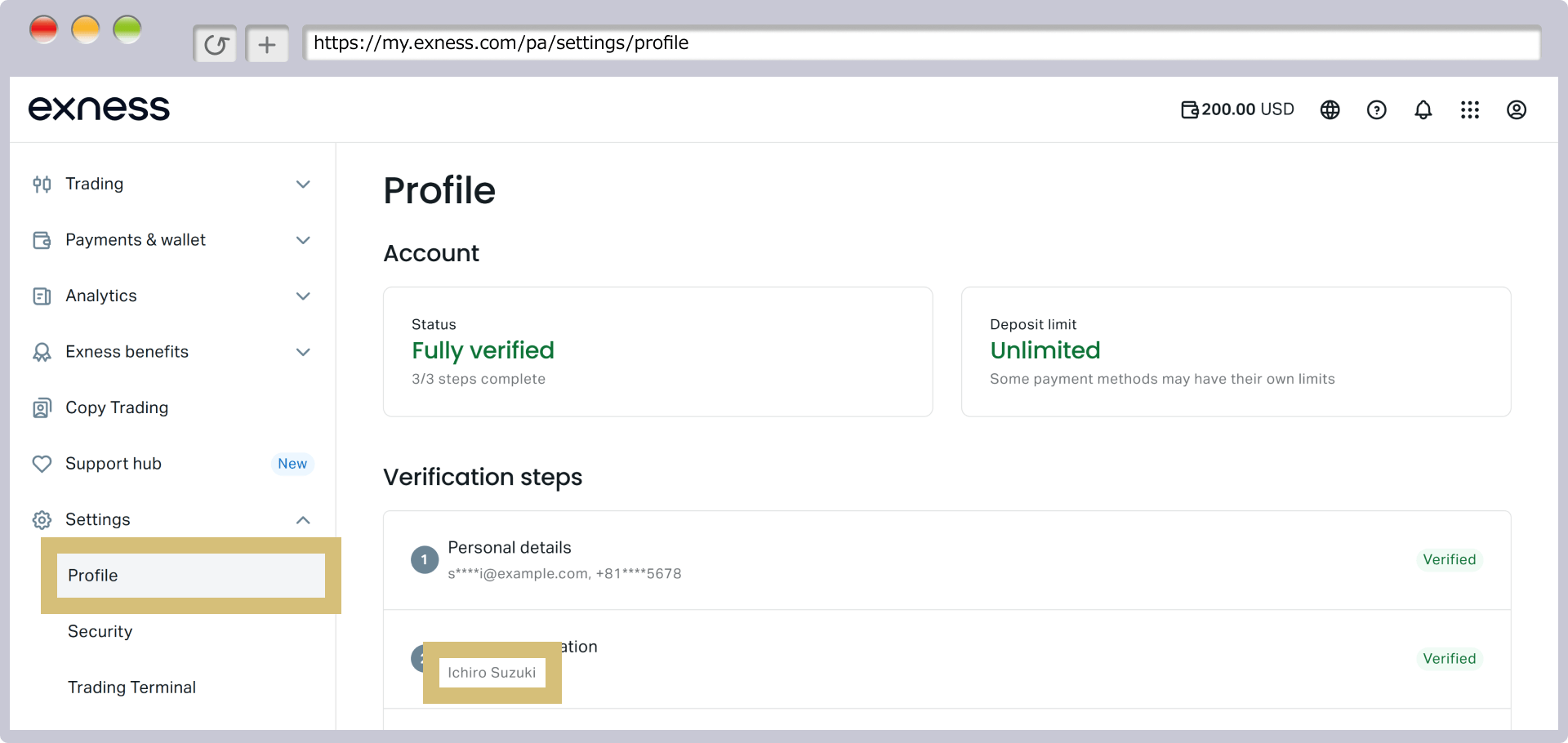
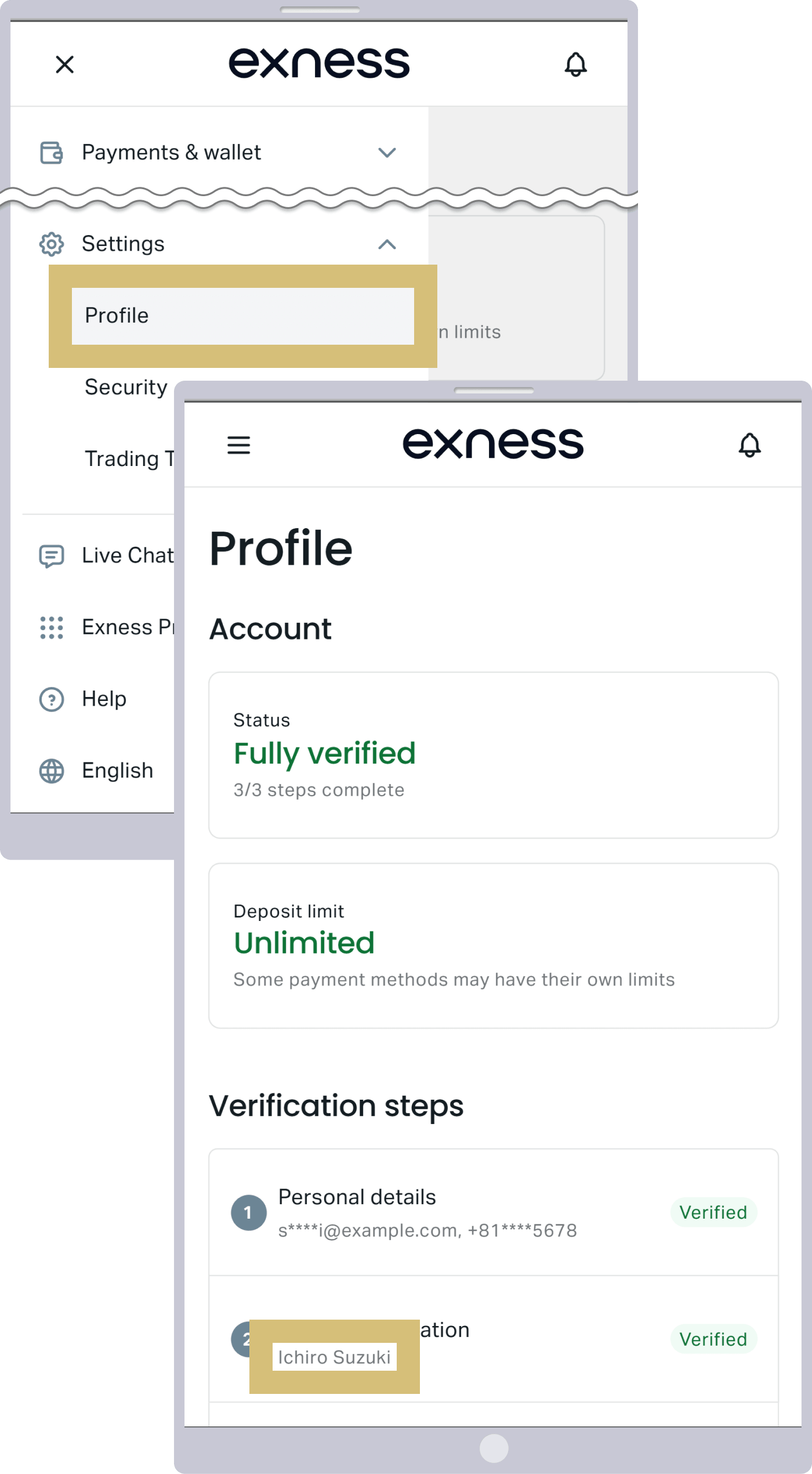
You can check the name on your Exness trading account by selecting "Verification" under "Profile" in the Personal Area.
Withdrawals can only be made using the same payment method used for the deposit.
At Exness, as a precaution against money laundering, you must withdraw funds up to the amount you deposited using the same method you used to make the deposit. If you have used multiple different deposit methods, you may withdraw your profits in proportion to the amount deposited via each method.Additionally, withdrawals are processed according to a priority order, with credit/debit cards taking the highest priority, followed by other deposit methods. When depositing funds into your Exness trading account, please be sure to review these withdrawal rules and select the appropriate deposit method.
Exness Deposit Methods
Deposit Method 1: Credit/Debit Card
At Exness, you can deposit funds into your Exness trading account using your credit or debit card. We currently support two card brands—VISA and Mastercard—and accept four types of cards: Visa, Visa Electron, MasterCard, and Maestro.
Points

(*) At Exness, VISA and Mastercard are accepted for deposits and withdrawals in USD.
Deposits via credit/debit card are accepted in USD (U.S. dollars), and there are no deposit fees.When you make a deposit using a credit or debit card, the funds will be credited to your Exness trading account in real time, 24 hours a day, 365 days a year, immediately after the deposit is processed. Additionally, since deposits can be made starting from the equivalent of at least 10 USD, you can begin trading with a small amount of capital.
Process for Making Deposits via Credit/Debit Card
At Exness, when making your first deposit via credit or debit card, you are required to complete full profile verification (identity verification) in your Personal Area and verify your credit or debit card. After selecting “Credit Card” on the deposit page in your Personal Area and completing the deposit process, the funds will be credited to your trading account immediately.
Only credit and debit cards that support 3D Secure can be used.
Credit and debit cards used to deposit funds into your Exness trading account must support 3D Secure.3D Secure is an authentication service designed to ensure secure credit card transactions, such as when shopping online. If your credit or debit card does not support 3D Secure, we will be unable to verify it; therefore, please check in advance to ensure your card supports 3D Secure.

Deposit Method 2: Neteller
At Exness, you can deposit funds from your Neteller account into your Exness trading account. Deposits via Neteller are supported in USD (U.S. dollars) and EUR (euros) (*).There are no deposit fees, and if you already have a Neteller account, funds can be transferred to your Exness trading account in real time, 24 hours a day, 365 days a year, immediately after completing the deposit process. However, since Neteller is not available to customers residing in Japan, this deposit method is intended for those using Exness from countries other than Japan.
(*) The currencies supported by Neteller may vary depending on the region where your account was opened. Please check the currencies available for selection on the deposit screen.
Neteller

The Process for Making Deposits via Neteller
If you select “Neteller” on the deposit page in your Exness Personal Area and complete the deposit process, the funds will be credited to your trading account immediately.

Neteller is an online wallet service operated by the UK-based Paysafe Group that can be used anywhere in the world. You can use Neteller’s prepaid card to make purchases at stores or online in countries around the world. You can also withdraw cash in local currency at any ATM that accepts Mastercard.You can easily make payments to merchants, send international money transfers, and exchange cryptocurrencies and foreign currencies using international currencies and cryptocurrencies.
Deposit Method 3: Skrill
At Exness, you can deposit funds from your Skrill account into your Exness trading account. Deposits via Skrill are supported in USD (U.S. dollars) and EUR (euros) (*).There are no deposit fees, and if you already have a Skrill account, you can transfer funds to your Exness trading account in real time, 24 hours a day, 365 days a year, immediately after completing the deposit process. However, since Skrill is not available to clients residing in Japan, this deposit method is intended for those using Exness from countries outside of Japan.
(*) The currencies supported by Skrill may vary depending on the region where your account is opened. Please check the currencies available for selection on the deposit screen.
Points About Skrill

The Process for Making a Deposit via Skrill
If you select "Skrill" on the deposit page in the Exness Personal Area and complete the deposit process, the funds will be credited to your trading account immediately.
Skrill is an online wallet service operated by the UK-based Paysafe Group, similar to Neteller, that can be used anywhere in the world. Skrill prepaid cards can be used at online stores worldwide.In addition, you can instantly transfer funds anywhere in the world between Skrill accounts, and Skrill offers the “Skrill Money Transfer” service, which allows you to send money directly to a bank account even if the recipient does not have a Skrill account.
If You Are Unable to Deposit Funds into Your Exness Trading Account
At Exness, we offer a wide range of deposit methods to ensure your convenience, but there are several possible reasons why you might be unable to make a deposit. Please review the causes and solutions for being unable to deposit funds into your Exness trading account.
Reasons Why You Can't Make a Deposit with Exness
If you are unable to make a deposit with Exness, the following are the main possible causes.
Main Reasons Why You Can't Make a Deposit with Exness
You have made a deposit that is less than the minimum deposit amount but greater than the maximum deposit amount.
If you are unable to make a deposit with Exness, please check to see if the amount you are attempting to deposit is below the minimum deposit amount or exceeds the maximum deposit limit, and then complete the transaction within the specified amount range.
I am making a deposit under a name different from the one on my Exness account
If you are unable to make a deposit with Exness, please verify that the name on your Exness account matches the name on the credit card or online wallet you are using for the deposit. Exness does not allow deposits made under a name other than your own, even if that name belongs to a family member. Please ensure that you make the deposit using a name that matches the one on your Exness account.
You are using a credit card brand that is not supported by Exness
Exness accepts deposits via credit and debit cards, but only two card brands are supported: "VISA" and "Mastercard." American Express and Diners Club are not supported, so if you are unable to make a card deposit with Exness, please check your card brand.Additionally, some card issuers may restrict deposits to FX brokers. If you are unable to make a deposit even though you are using a valid card from one of the supported brands that has not reached its credit limit, please contact your card issuer to inquire about the issue.
There are insufficient funds in the online wallet
If you are unable to make a deposit using an online wallet on Exness, your online wallet balance may be insufficient. Please check your wallet balance and try making the deposit again. Additionally, deposits may not be possible if the online wallet provider is performing maintenance or other operations. Please check with the respective service provider for maintenance information and use an alternative deposit method as appropriate.
Profile verification has not been completed
To make a deposit with Exness, you must complete the profile verification (identity verification) process. Once your submitted identity verification documents and proof of address have been approved, you will be able to make a deposit.
What to Do If You Can't Make a Deposit with Exness
At Exness, the time it takes for funds to appear in your account varies depending on the deposit method you use. If funds have not been credited to your account and the deposit has not been processed even after the processing time for the respective payment method has elapsed—despite there being no issues with your profile verification or the submission of identification documents—please check the processing status under “Trade History” in your Personal Area.The processing status will be displayed as one of the following: “Completed,” “In Progress,” or “Declined.”
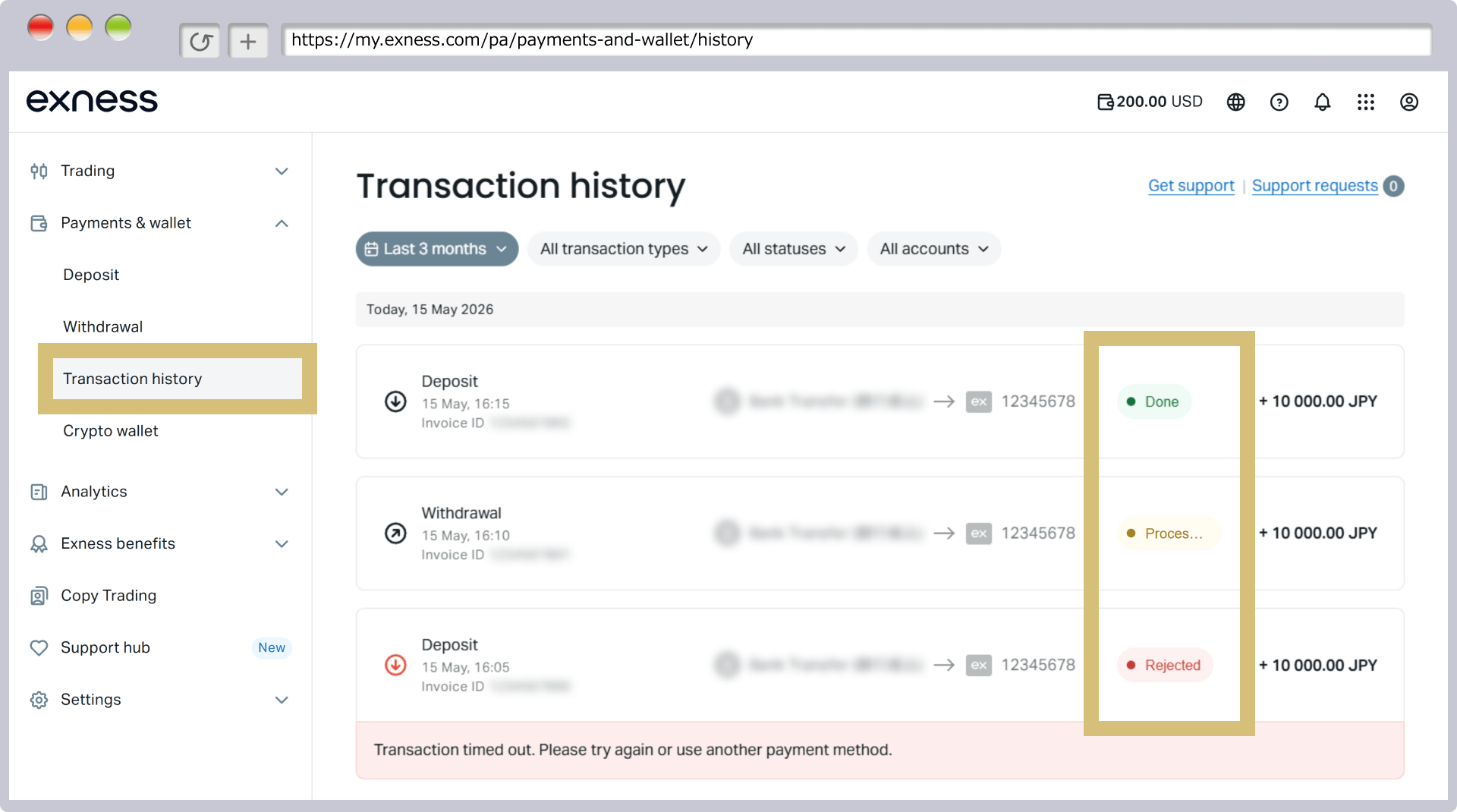
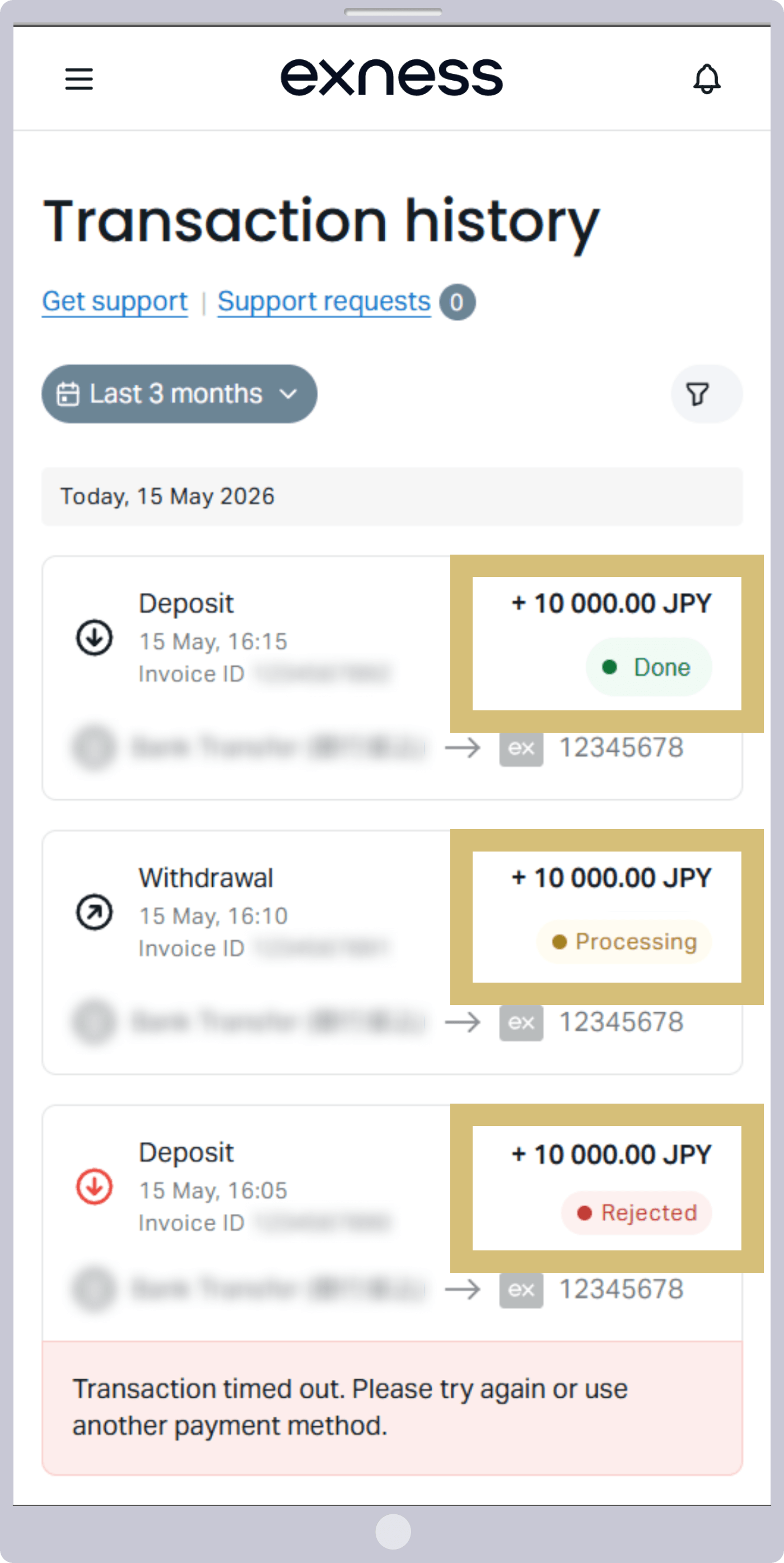
If your deposit has not been credited even after the processing time has elapsed, please contact the Exness Support Desk with the following information.
Information Needed for Inquiries Regarding Unable-to-Deposit Issues
If you are unable to make a deposit, please review Exness's deposit rules and try again following those guidelines.
If you are still unable to deposit funds into your trading account even after reviewing the deposit rules, please contact the Exness Support Desk with the following information on hand.
Information Needed for Inquiries Regarding Failed Payments
| Exness Support Desk |
[email protected] |
The secret word (phone password) is the password required for identity verification when contacting Exness Support. This password, also known as the phone password, is sent via SMS by Exness the first time you contact Exness Support. Please note that the phone password is a fixed password assigned to each customer and will not be changed.
From now on, when submitting inquiries that involve personal information—such as those regarding identity verification procedures or deposits and withdrawals—please have your “trading account number” and “phone password” ready before contacting the Exness Support Desk.
Frequently Asked Questions (FAQ) About Exness Deposit Methods
-
I can't make a deposit to Exness. Why is that?
To make a deposit with Exness, you must complete the profile verification (identity verification) process. Once the documents you submitted for identity verification and address verification have been reviewed and approved, you will be able to make a deposit.
Read More
16.09.2021
-
Does Exness charge a deposit fee?
No, Exness does not charge any deposit fees, and all deposit methods are available free of charge. However, depending on the online wallet you use, fees may apply when making a deposit, so please check with the respective service provider.
Read More
16.09.2021
-
Please tell me what deposit methods are available on Exness.
Exness accepts deposits via credit/debit cards and online wallets (Neteller, Skrill). Please note, however, that the use of Neteller and Skrill by users in Japan is currently restricted.
Read More
16.09.2021
-
How long does it take for funds to appear in my account after I make a deposit with Exness?
At Exness, deposits made via credit/debit cards or online wallets (Neteller, Skrill) are credited to your trading account instantly, 24 hours a day, 365 days a year. Please note, however, that the use of Neteller and Skrill by users in Japan is currently restricted.
Read More
20.06.2021