














How to Open an Additional Account with Exness
How to Open an Account
How to Open an Additional Account with Exness
With Exness, you can easily open an additional account. Simply log in to your Exness Personal Area or the Exness Trading App, select your desired account type, and specify the maximum leverage and account currency—your additional account will be opened immediately.
At Exness, you can hold a total of 200 accounts per account—100 MetaTrader 4 (MT4) accounts and 100 MetaTrader 5 (MT5) accounts. Feel free to use multiple accounts according to your trading style.Please note that you can only open additional Exness accounts once the profile verification (ID verification) for your primary trading account has been completed. If your primary trading account has not yet been verified, please submit your ID and proof-of-address documents to complete the verification process.
Benefits of Opening an Additional Account with Exness
With Exness, opening an additional account allows you to use different account types for specific purposes or allocate funds to diversify risk, making your FX trading experience more convenient. Open an additional account with Exness and discover the benefits of using multiple accounts.
You can choose from five different account types
Exness offers five account types, each with its own unique features.By opening an additional account, you can access all of these account types. Exness offers a total of five account types: the Standard Cent and Standard accounts, which are easy to use for all traders—from beginners to advanced—and the Low Spread, Zero, and Pro accounts, which are recommended for intermediate and advanced traders.
Trading conditions—such as order execution methods, spreads, and whether trading commissions apply—vary by account type, so it is very important to choose the account type that best suits your trading style and strategy. Since your choice of account type significantly affects your performance, we recommend opening additional accounts based on the specific securities and market conditions to ensure you trade in the optimal environment.
Please note that at Exness, you can hold up to 200 live trading accounts (100 MT4 accounts and 100 MT5 accounts) per account.After opening a new account, you can open up to 199 additional accounts. However, please note that to reduce server load, the maximum number of accounts that can be opened for each account type is set at 100 (for Standard Cent accounts, up to 10 accounts each on MT4 and MT5, for a total of up to 20 accounts).

Hedging across multiple accounts expands your trading options
At Exness, you can engage in hedging across multiple accounts—a practice that is prohibited by many FX brokers. Since you can hedge while utilizing multiple accounts, this expands your trading options and offers the potential for increased profit opportunities.Hedging is a trading strategy in which you simultaneously hold both a long and a short position in the same currency pair. It is used to target significant profits or to hedge against risk when you want to minimize losses.
One characteristic of hedging is that there are strict regulations in place: domestic FX brokers generally prohibit hedging altogether, while overseas FX brokers only allow it within the same account.Under these circumstances, using multiple accounts can sometimes result in unintentional hedging across accounts, which may be subject to penalties as a prohibited activity. However, at Exness, there are absolutely no restrictions on hedging, so please feel free to use multiple accounts with confidence.
No account maintenance fees
Since Exness does not charge account maintenance fees, you can feel free to use multiple accounts. It is not uncommon for some FX brokers to charge account maintenance fees on accounts that have been inactive for a long time.Even if you open an additional account and allocate funds to it, there may be times when you don’t use that account for a while—perhaps while waiting for a trading opportunity or due to a change in your trading strategy. If account maintenance fees are deducted in such cases, it can make it difficult to manage multiple accounts.However, since Exness does not charge any account maintenance fees, you can enjoy trading across multiple accounts with complete peace of mind.
How to Open an Additional Account with Exness: Steps and Procedures
To open an additional account with Exness, simply log in to your Personal Area from any device—such as a PC, smartphone, or tablet—and follow the steps. You can also open an additional account using the “Exness Trading App” provided by Exness. In either case, you can open an additional account by entering a few simple details and selecting your preferred account settings.
The steps for opening an additional account with Exness are as follows. Please note that you cannot open an additional account with Exness unless your profile verification is complete. If your profile has not been verified, please complete the profile verification process first.
The steps for opening an additional account from the Exness Personal Area are as follows.
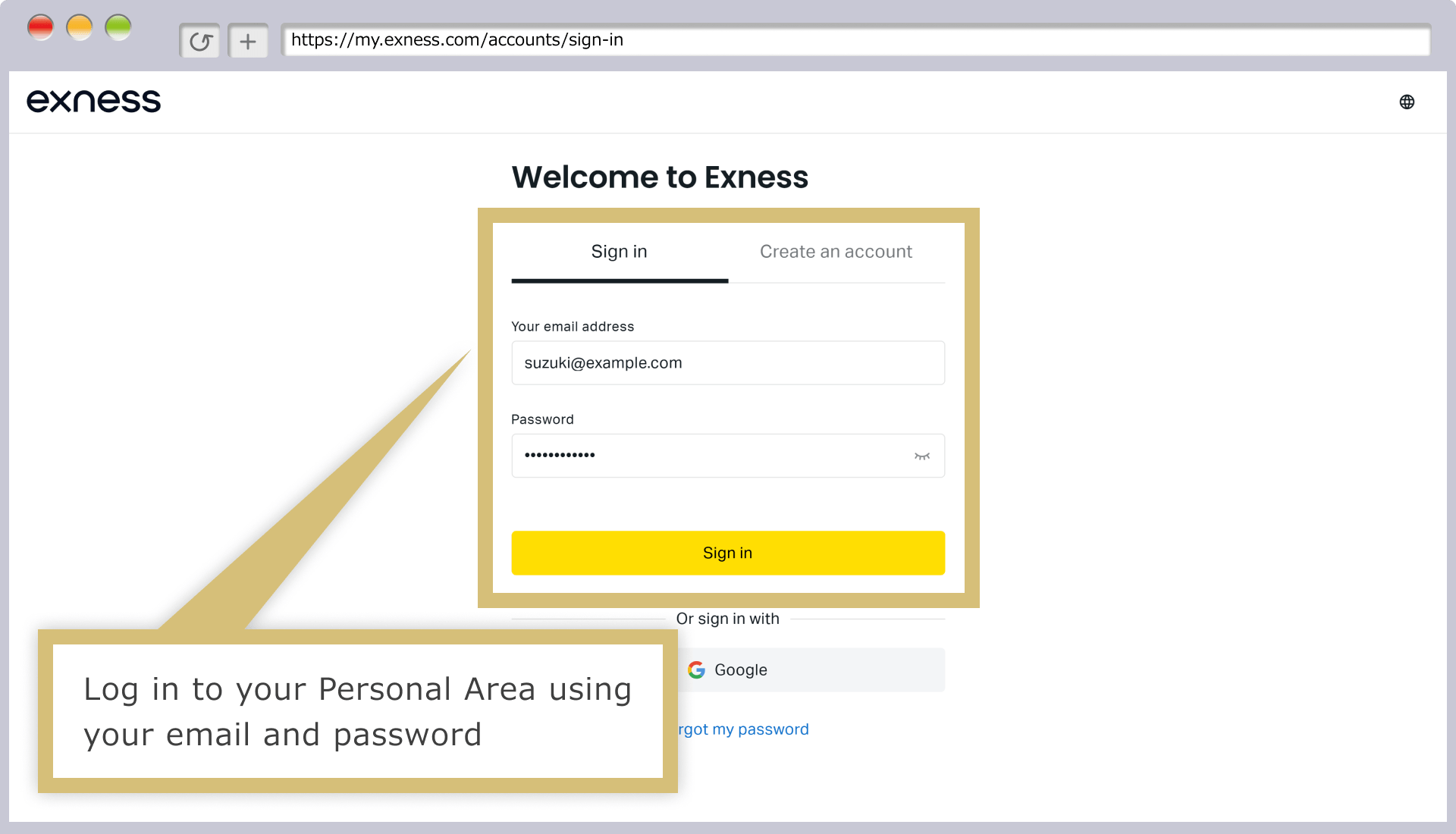
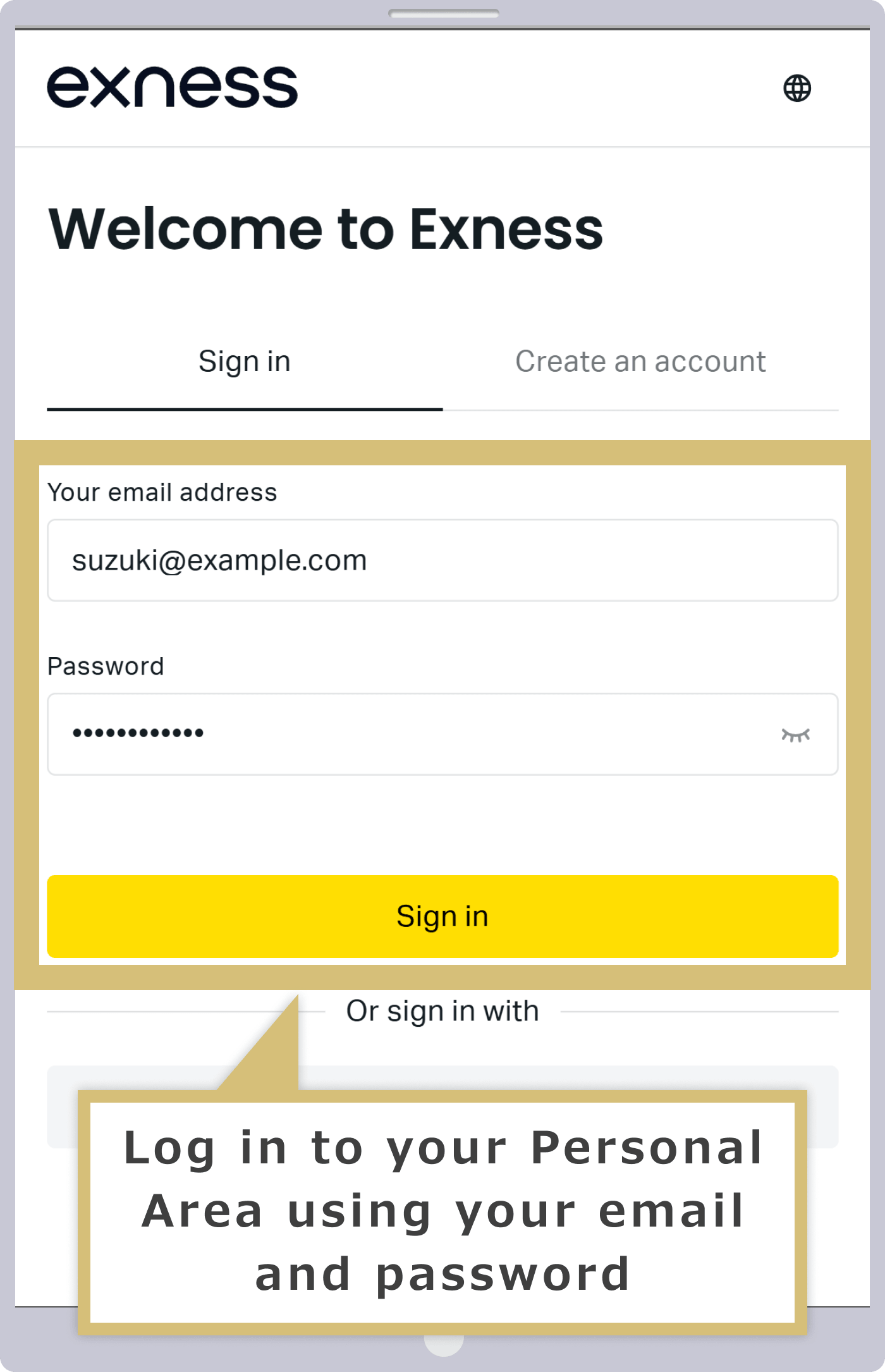
Log in to Your Personal Area
Enter the "email address" you used to register with Exness and the "login password" for your Personal Area to log in to your Exness Personal Area.
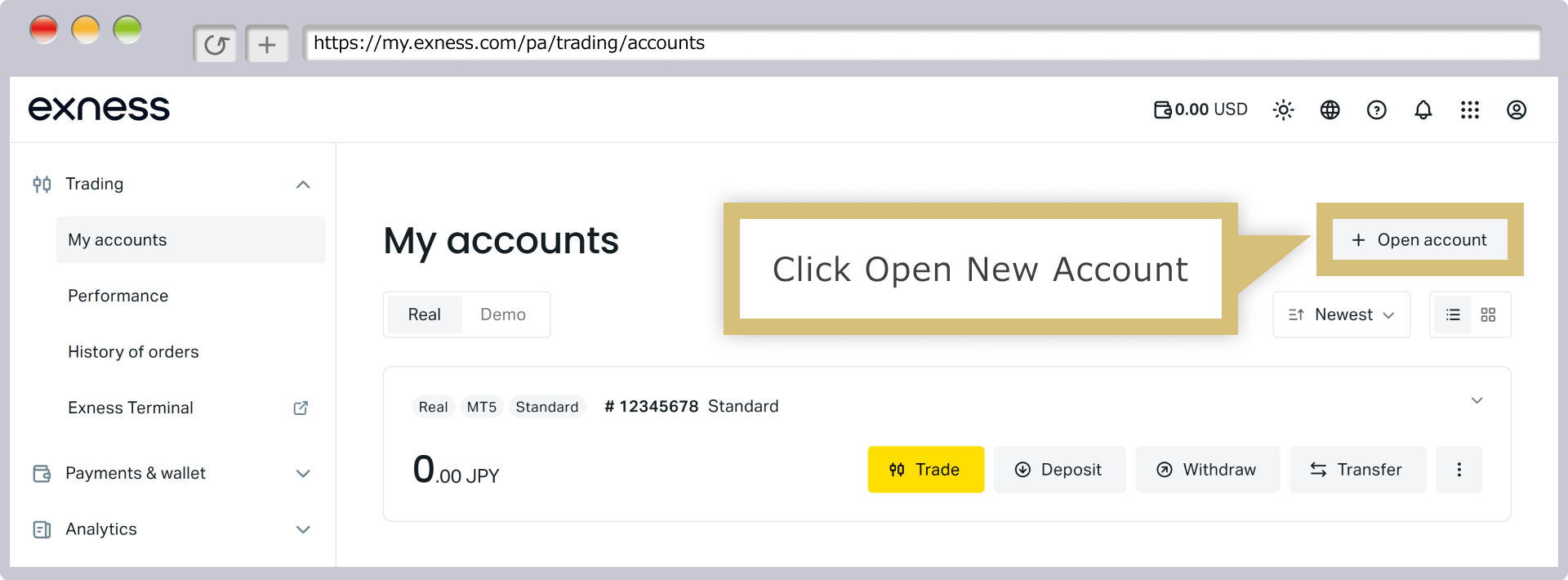
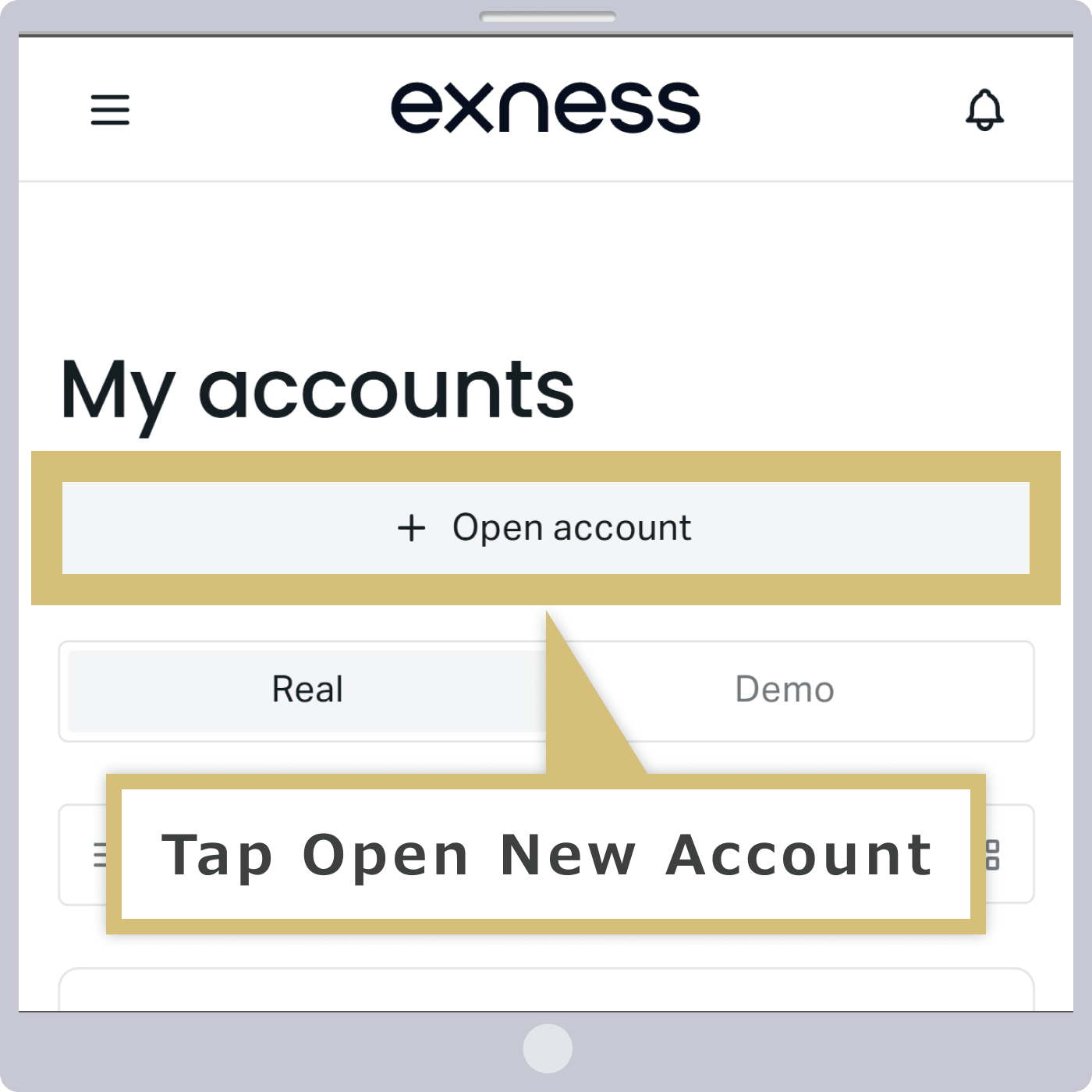
Click “+ Open a New Account”
Tap "+ Open a New Account"
Click "+ Open a New Account" in the upper-right corner of your Personal Area.
Tap “+ Open a New Account” at the top of the Personal Area.
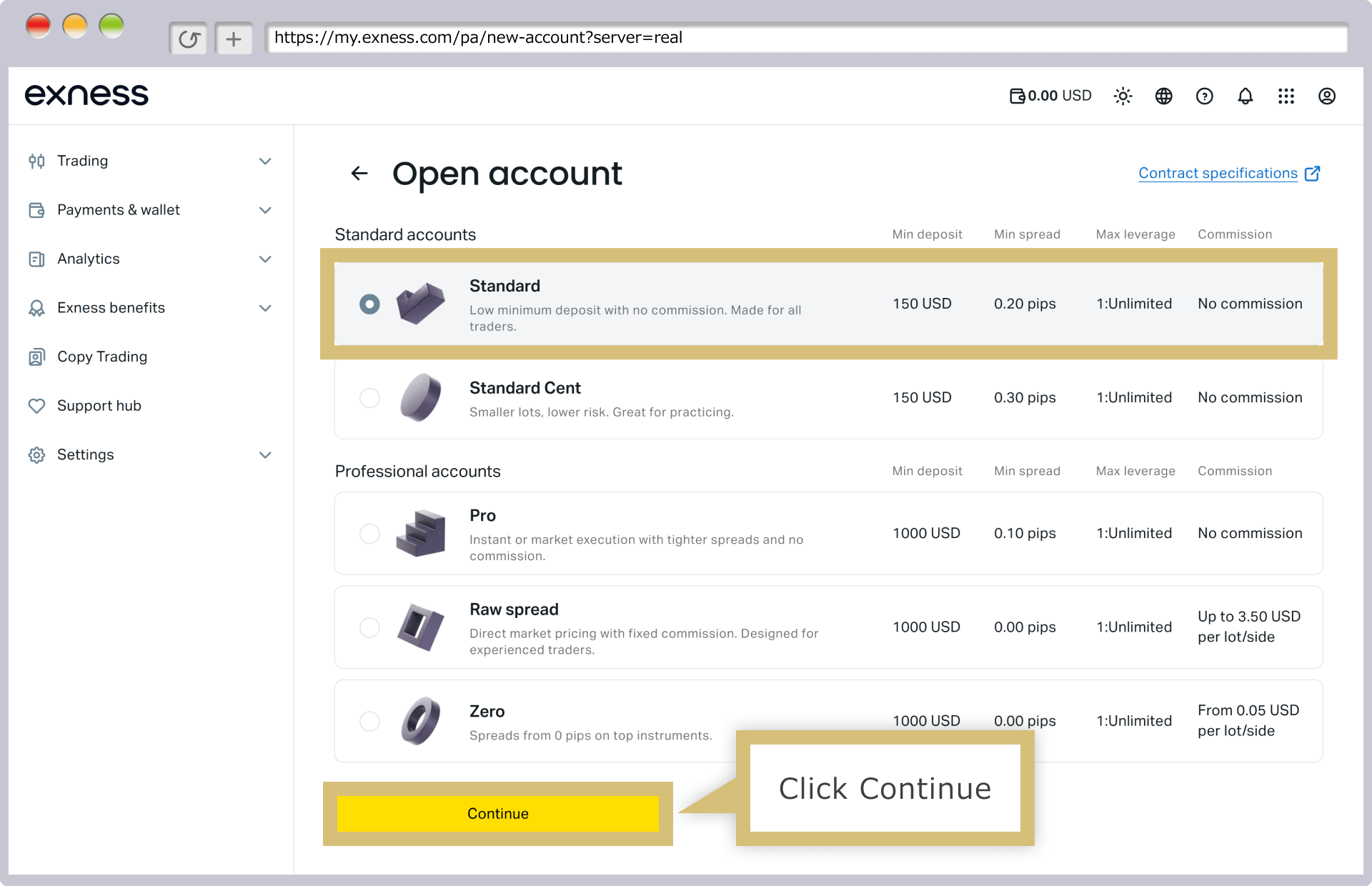
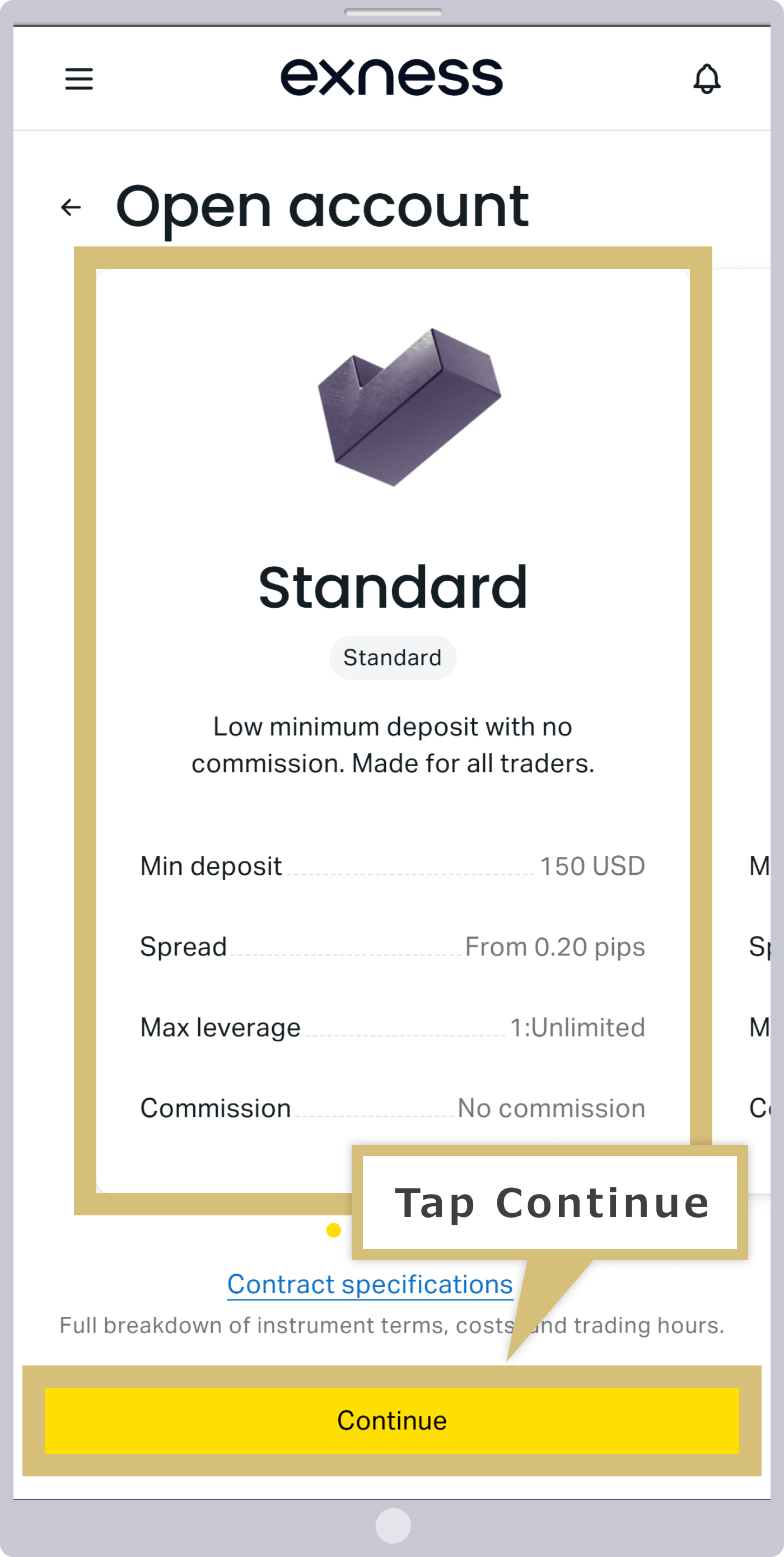
Choosing a Trading Platform and Account Type
Select your preferred "Account Type" for the additional account, then click "Continue."
Select your preferred "Account Type" for the additional account, then tap "Continue."
Filling Out the Additional Account Opening Form
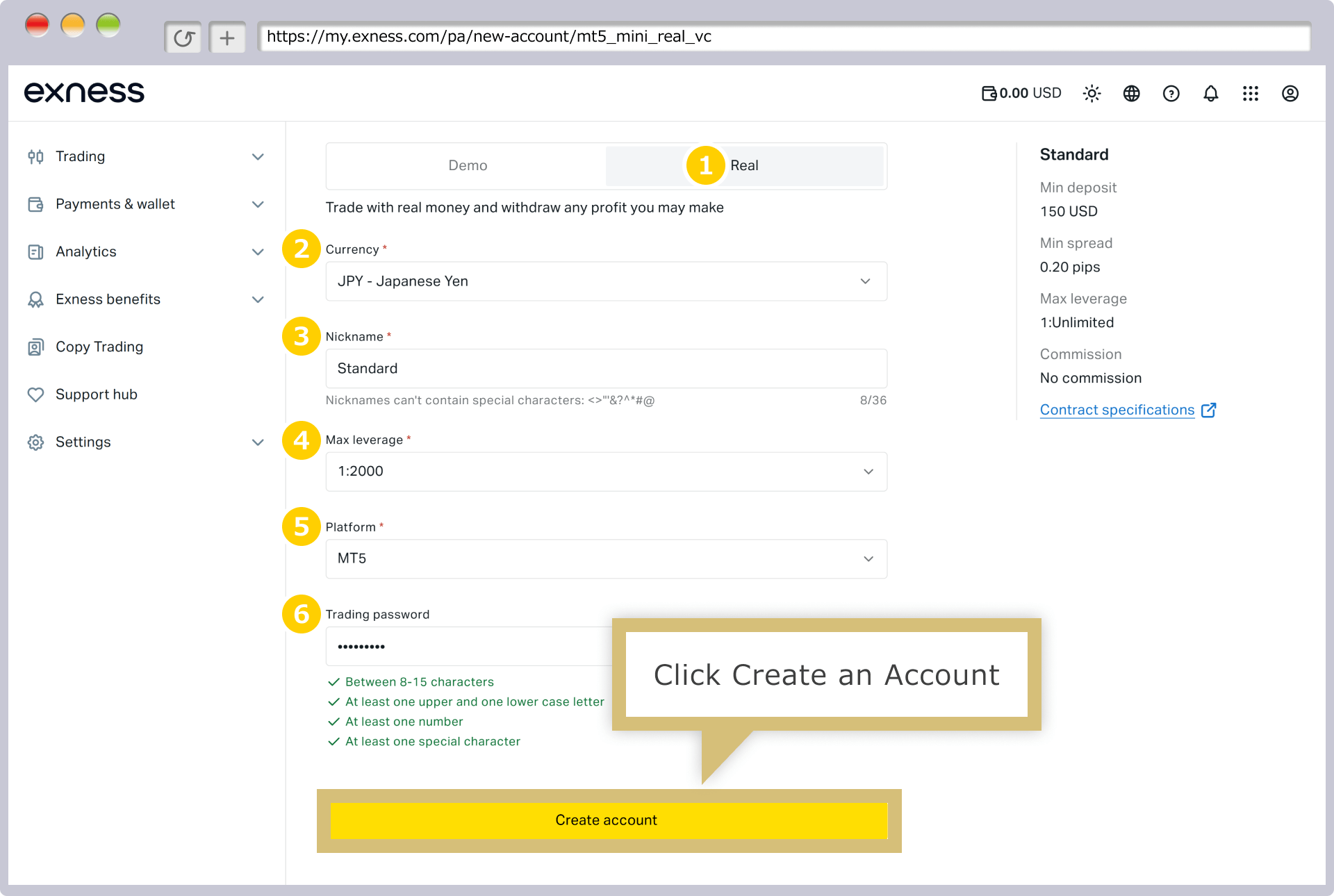
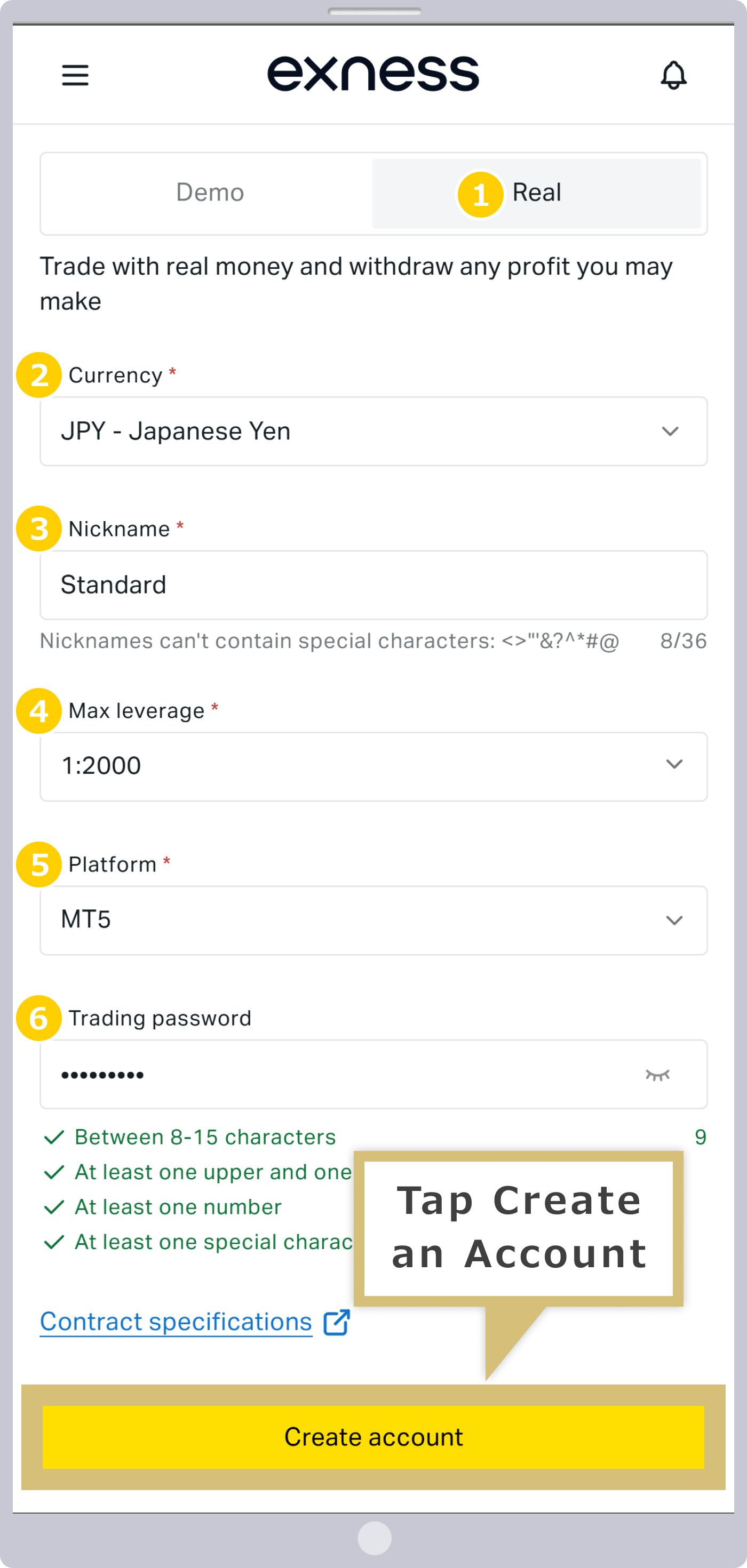
On the Additional Account Opening Form, select or enter the terms for the new trading account you wish to open, then click “Open Account.”
On the Additional Account Opening Form, select or enter the terms for the new trading account you wish to open, then tap “Open Account.”
|
Login Type |
Example: This trading account |
|
Currency |
Example) JPY - Japanese yen |
|
Account Nickname |
Example: Standard |
|
Maximum Leverage |
Example: 1:2000 |
|
Trading Platform |
Example: MT5 |
|
Setting Your Account Password |
Example: Pass1111# |
|
Login Type |
|
Example: This Trading Account |
|
Currency |
|
Example) JPY - Japanese yen |
|
Account Nickname |
|
Example: Standard |
|
Maximum Leverage |
|
Example: 1:2000 |
|
Trading Platform |
|
Example: MT5 |
|
Setting Your Account Password |
|
Example: Pass1111# |
① For the login type, please select “Main Trading Account.”
② "Currency" refers to the base currency of your trading account. The types of account currencies available vary by account type, so please select your preferred currency from the drop-down menu.
③ You may choose to specify an account nickname if you wish.
④ For the maximum leverage, please choose from "1:2" to "1:2000," or specify your desired ratio under "1:Custom."
⑤ Select your trading platform from "MT4," "MT5," or "Exness."
⑥ The account password is the password used to log in to the trading platform (MT4/MT5) and must be set for each trading account. Please set it to be 8–15 characters long, using a combination of uppercase and lowercase letters, numbers, and special characters.

Additional Account Opening Complete
Once your application via the Additional Account Opening Form is successfully completed, you will be automatically redirected to the Exness Personal Area, where the newly opened live trading account will be displayed.
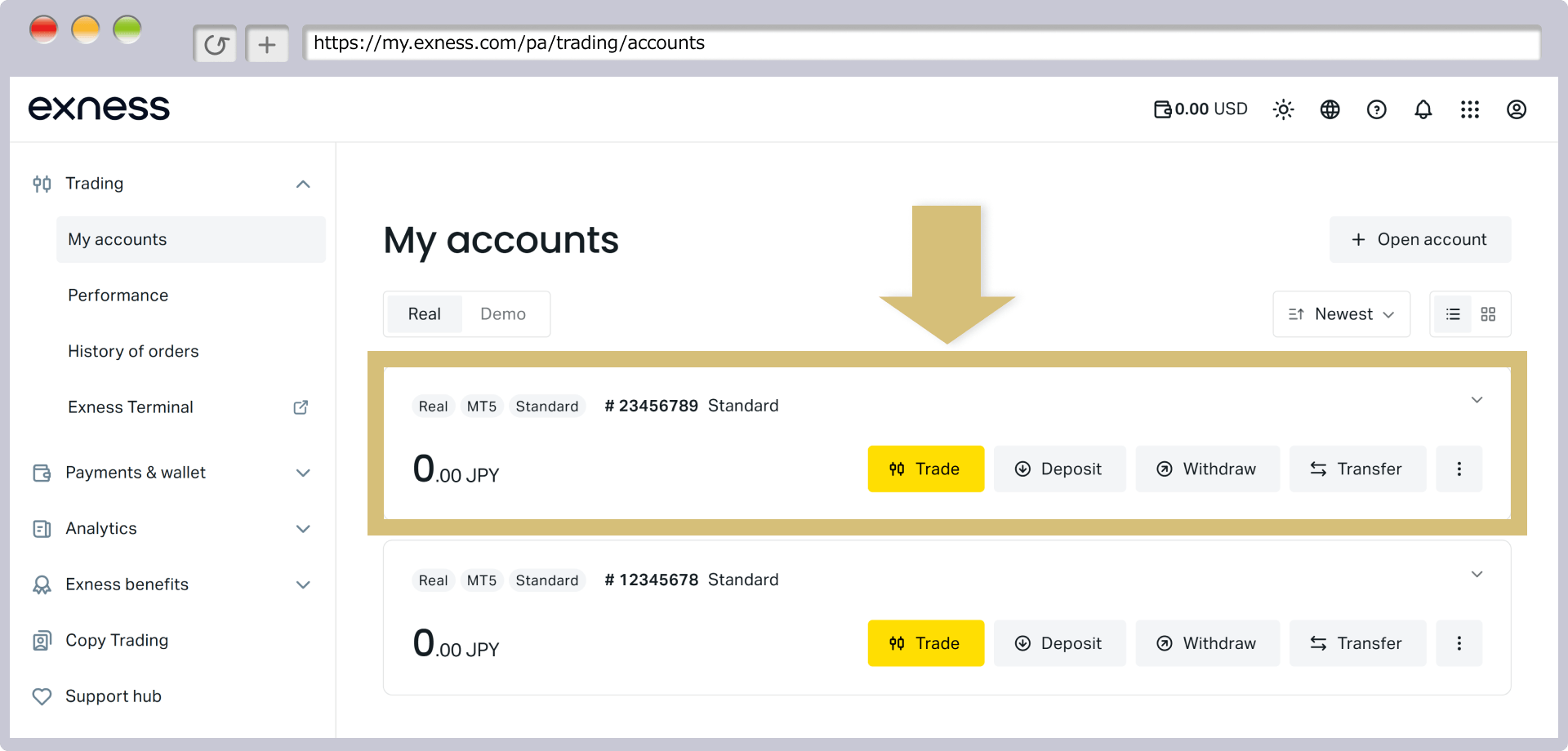
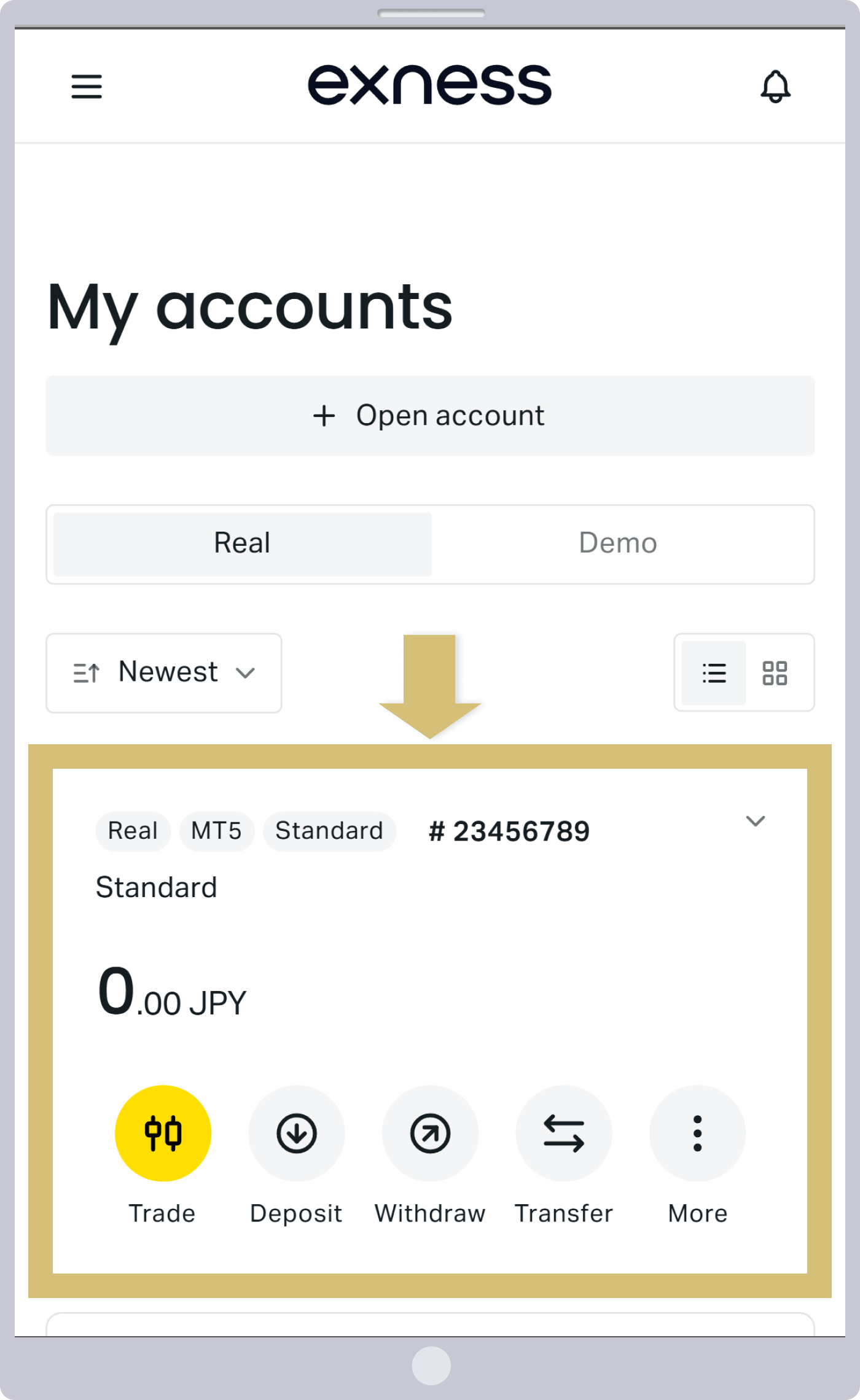
That completes the process of opening an additional account with Exness. Please deposit funds into or transfer funds to your additional account, then log in to the trading platform using your newly created MT4/MT5 account number to start trading on your additional account. (*1)
(*1) To make a deposit into an additional account, you must complete your profile verification.
Here are the steps to open an additional account using the Exness trading app:
Log in to the Exness Trading App
Enter the "passcode" you registered with the Exness trading app to log in to the Exness trading app.
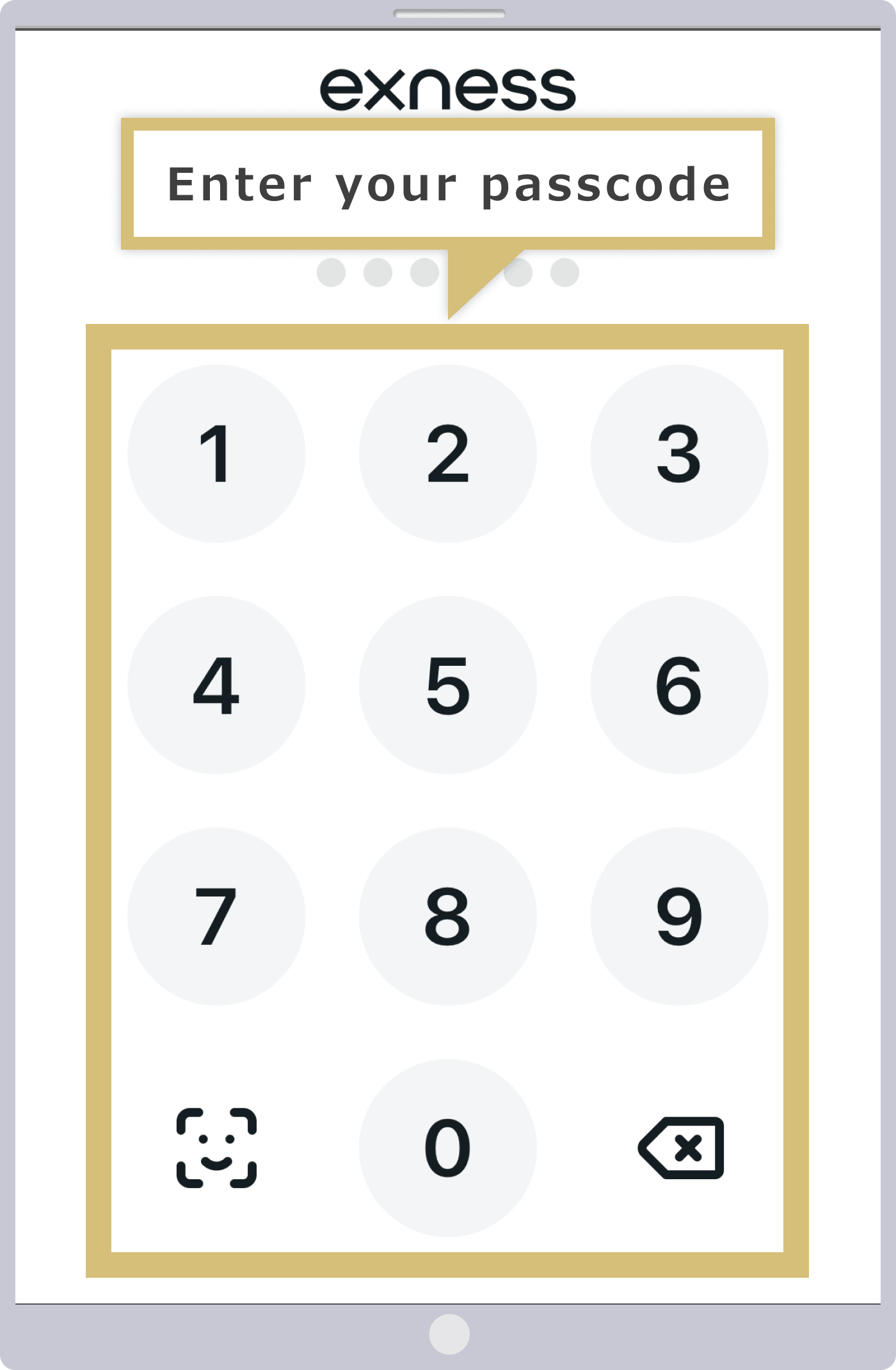
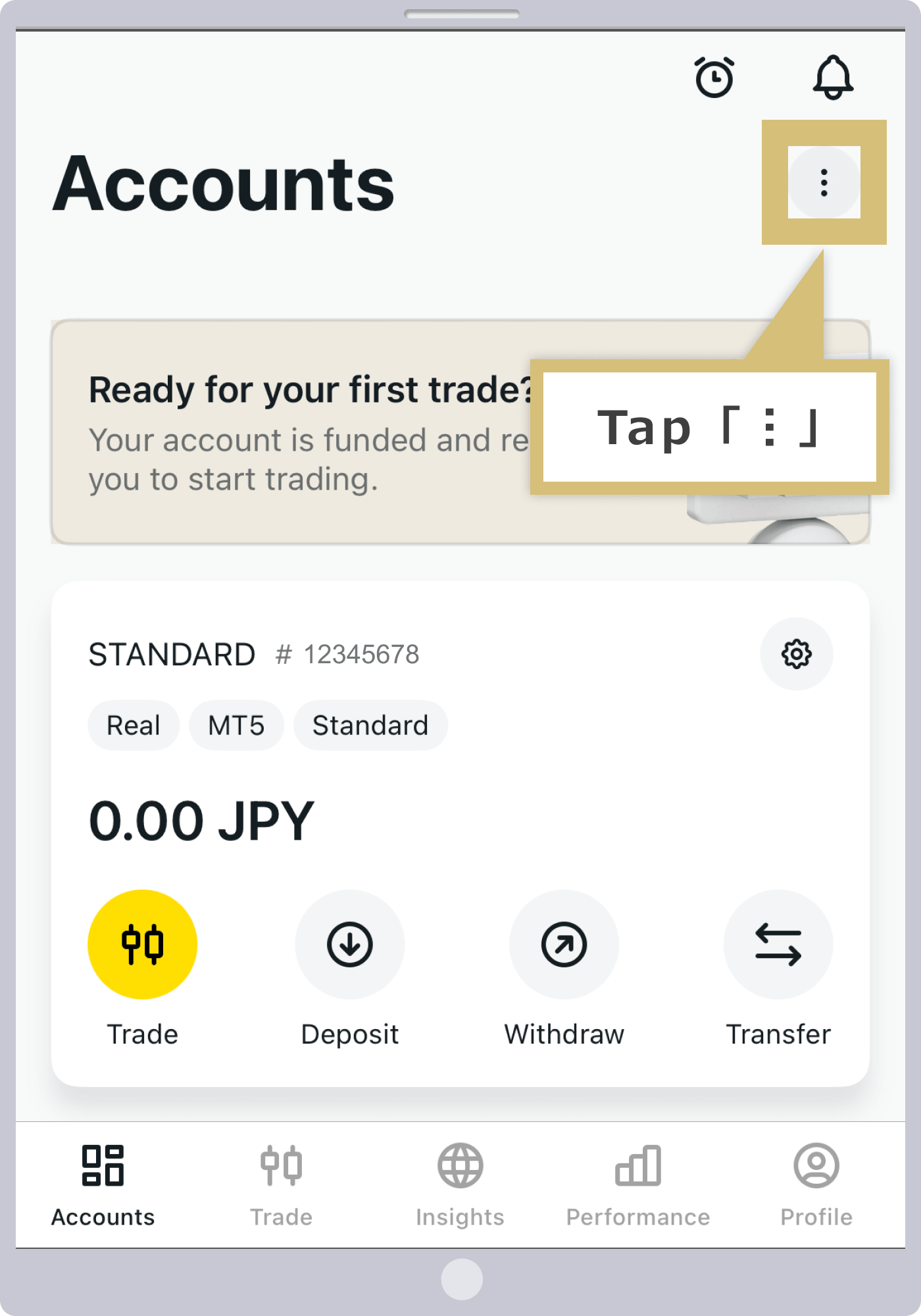
Tap “︙”
Tap the "︙" icon displayed in the upper-right corner of the account.
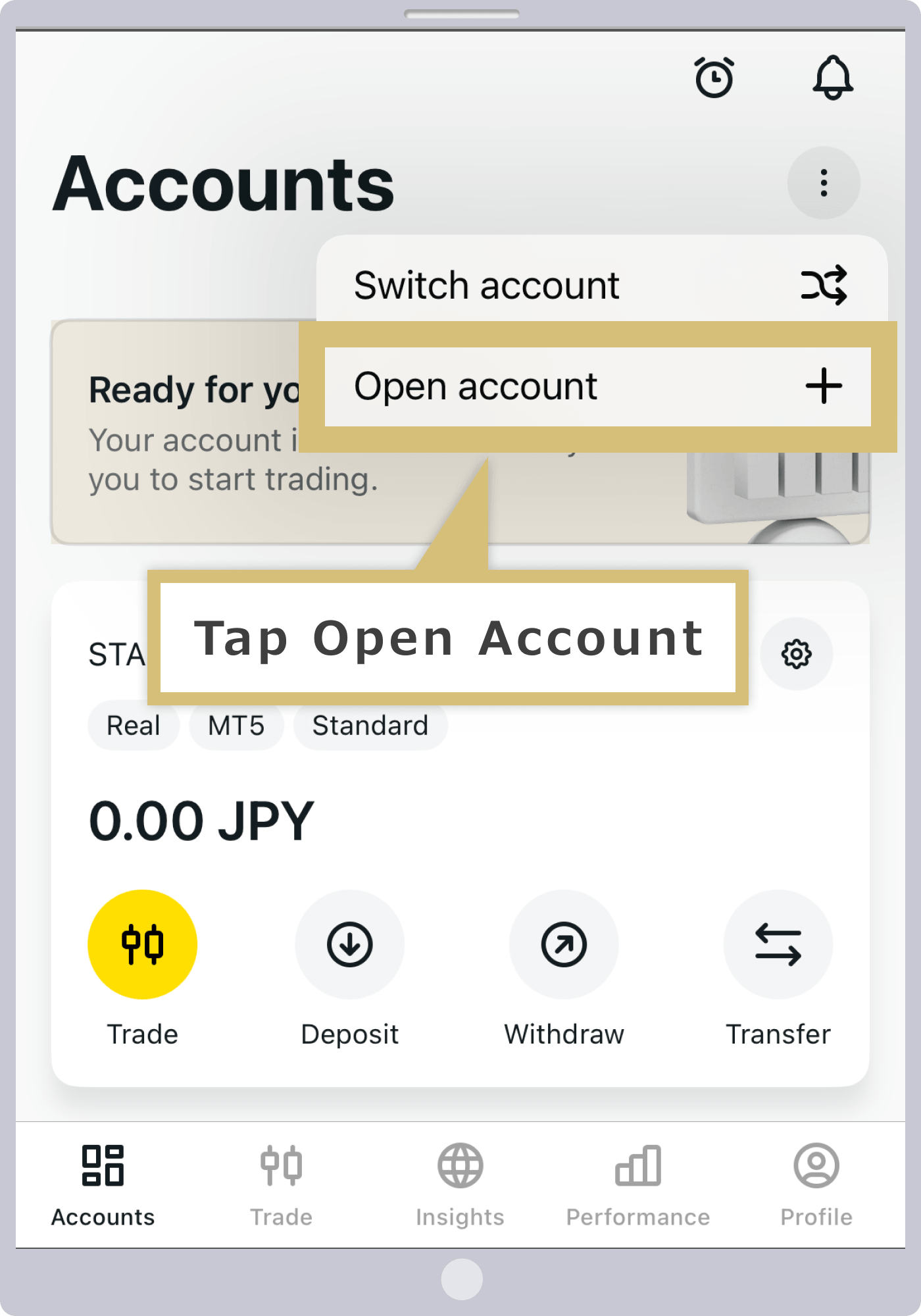
Tap "Open a New Account"
Tap "Open a New Account."
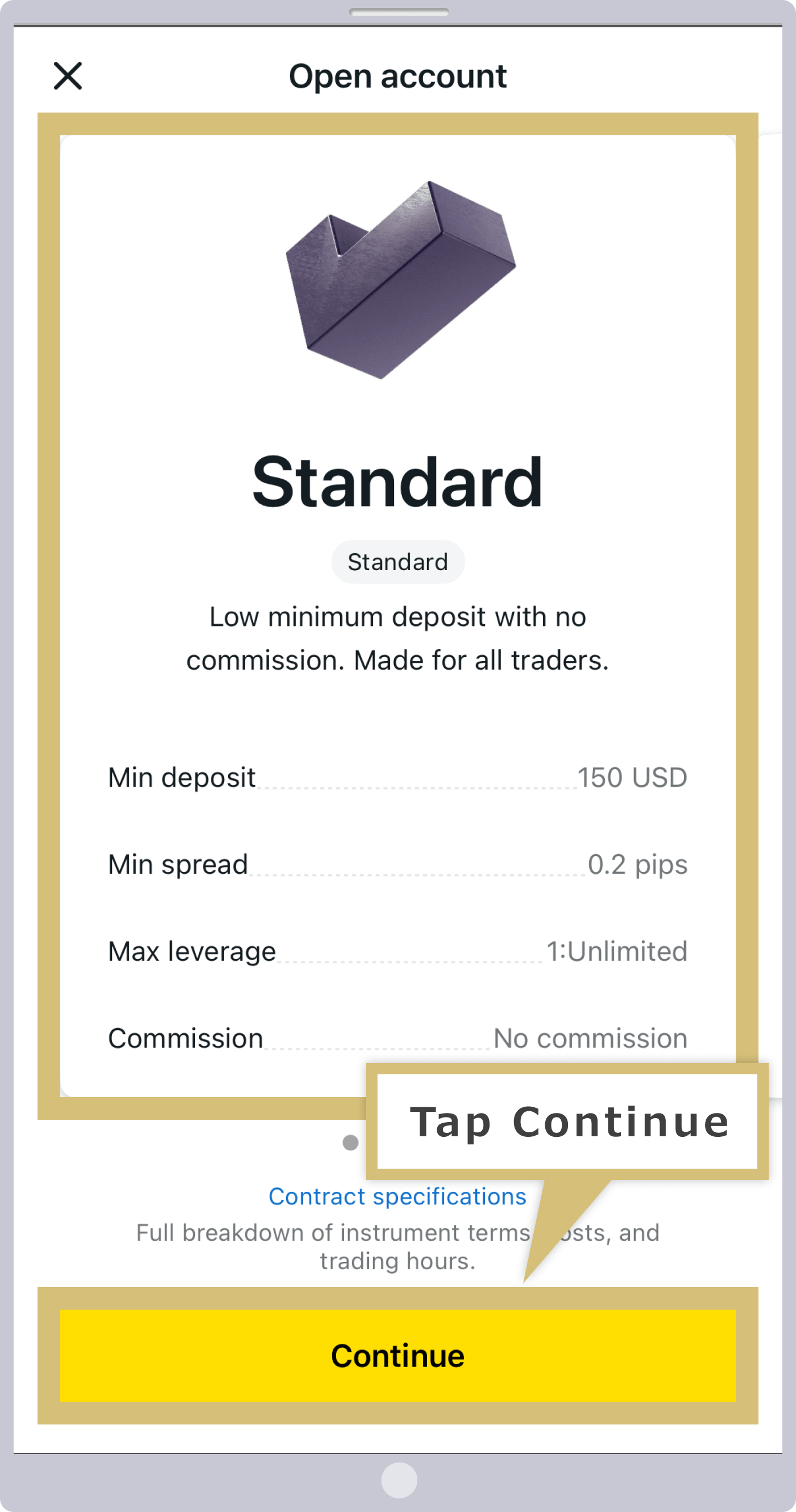
Selecting an Account Type
Swipe the screen horizontally to select your preferred account type, then tap "Continue."
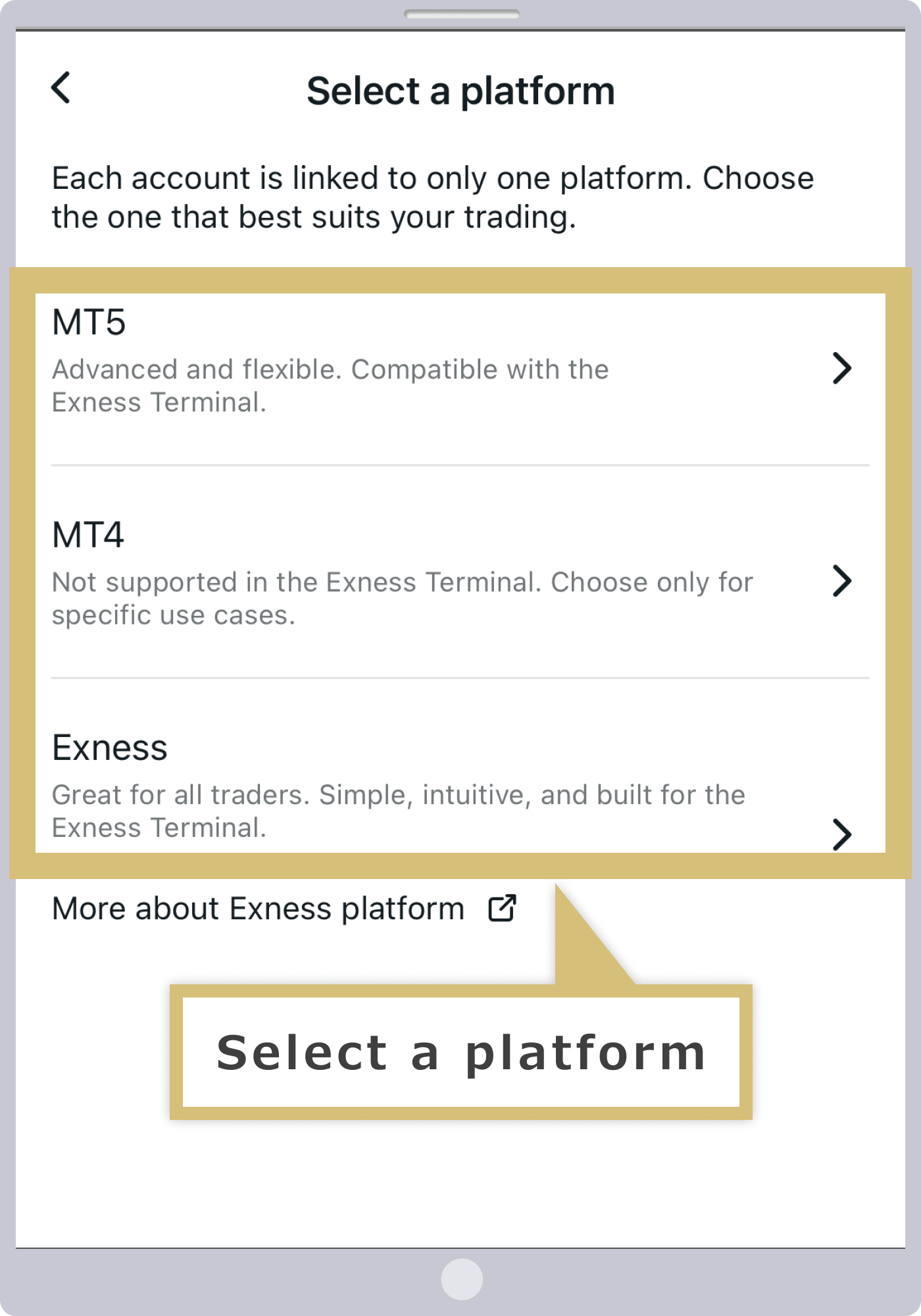
Choosing a Platform
Select your preferred trading platform.
Filling Out the Additional Account Opening Form
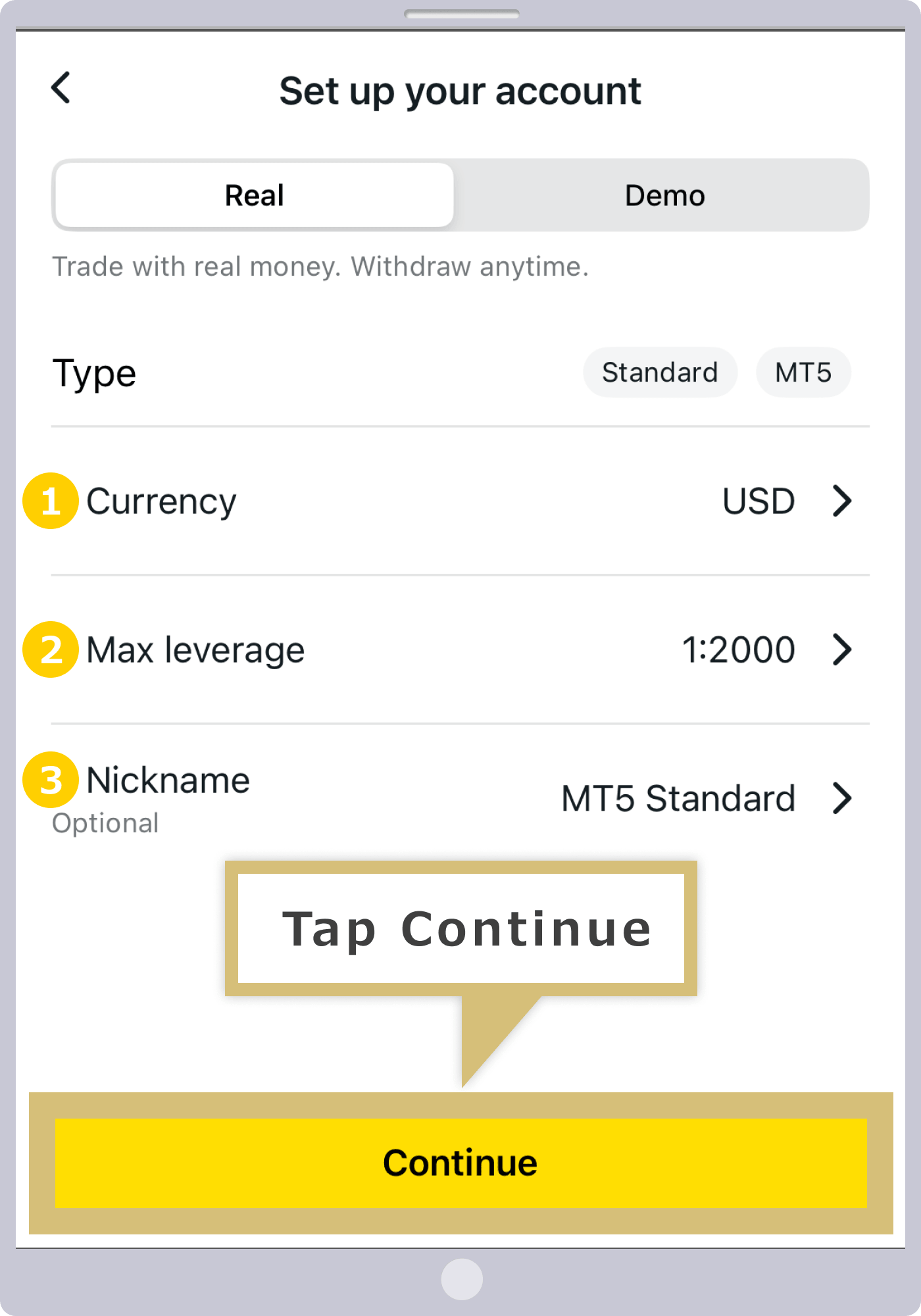
On the Additional Account Opening Form, select or enter the terms for the new trading account you wish to open, then tap “Continue.”
|
Currency |
Example: USD |
|
Leverage |
Example: 1:2000 |
|
Account Nickname |
Example: MT5 Standard Account |
|
Currency |
|
Example: USD |
|
Leverage |
|
Example: 1:2000 |
|
Account Nickname |
|
Example: MT5 Standard Account |
① "Currency" refers to the base currency of your trading account. The types of account currencies available vary by account type, so please select your preferred currency.
② For the maximum leverage, please choose from "1:2" to "1:2000," or specify your desired ratio using "1:Custom."
③ You may choose to specify an account nickname if you wish.
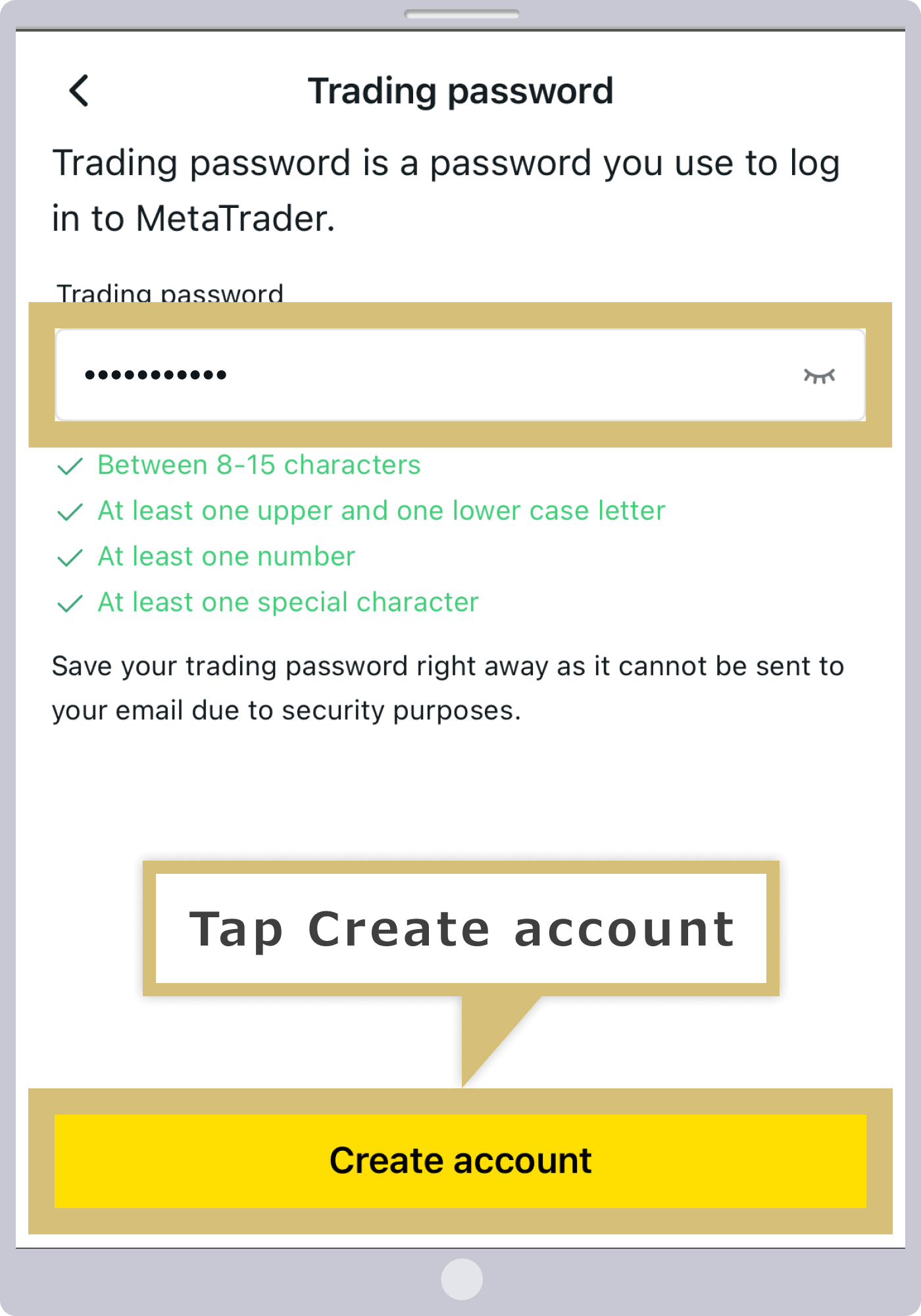
Setting Your Trading Password
When logging in to the trading platform (MT4/MT5), enter a login password consisting of 8 to 15 characters that include uppercase and lowercase letters, numbers, and special characters, then tap "Open Account."
Additional Account Opening Complete
Once your application via the Additional Account Opening Form is successfully completed, you will be automatically redirected to the Trading Accounts menu in the Exness trading app, where the newly opened live trading account will be displayed.
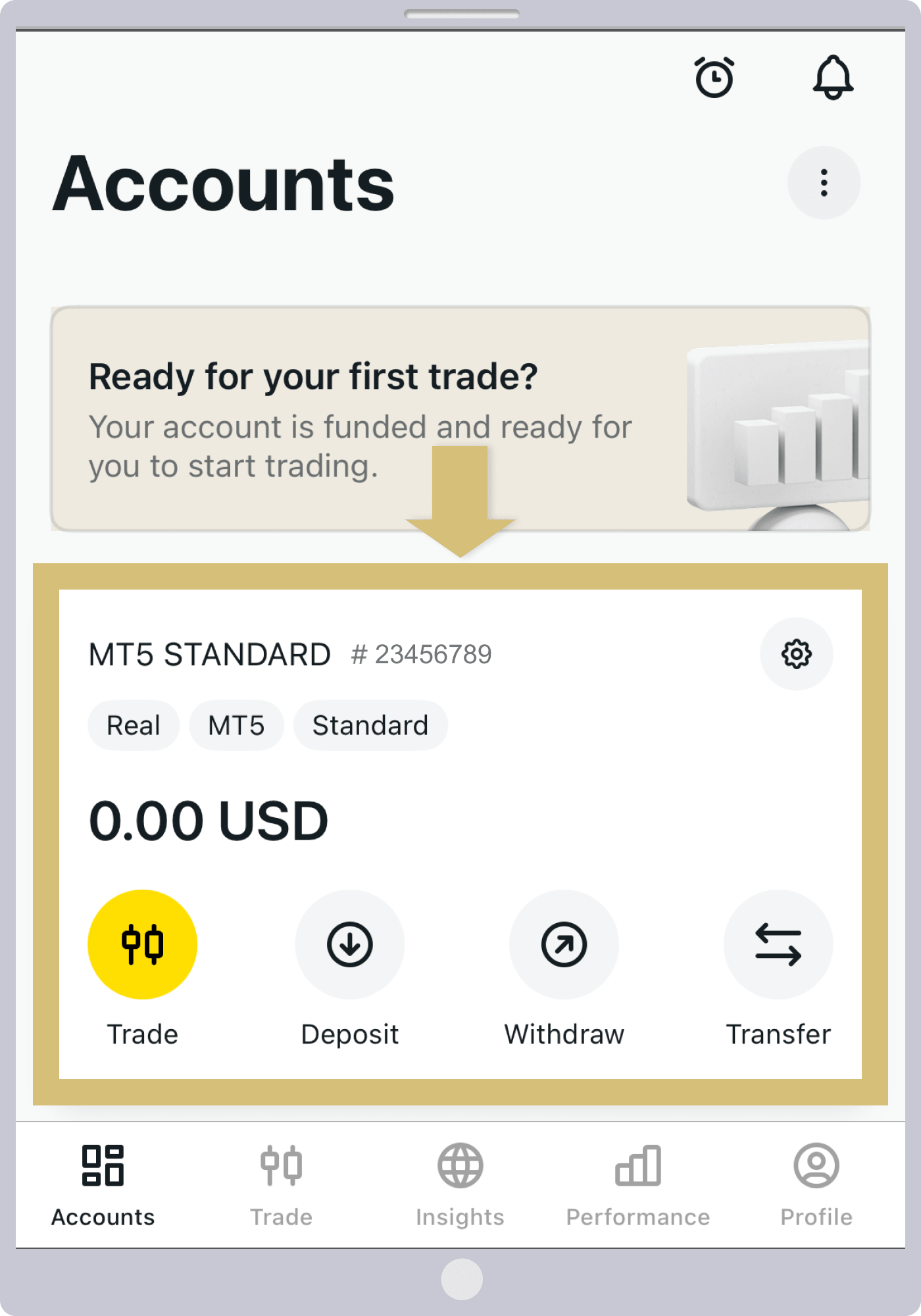
That completes the process of opening an additional account with Exness. Please deposit funds into or transfer funds to your new account, then log in to the trading platform using your newly created MT4/MT5 account number and start trading. (*1)
(*1) To make a deposit into an additional account, you must complete profile verification.
Important Notes Regarding Additional Accounts with Exness
With Exness, you can create additional accounts and manage multiple accounts to trade FX in the most optimal environment. However, there are some important points to note regarding additional accounts and the procedures involved, so please review them in advance.
Accounts with no activity for a certain period of time will be designated as "archived accounts."
Please note that at Exness, accounts that have not had any trading, deposits, or withdrawals for a certain period of time will automatically become archived accounts (dormant accounts) and will be moved to the “Archived Accounts” section of your Personal Area. However, accounts with a certain minimum balance will not be archived.Please note that the inactivity period and account balance thresholds for archiving differ between MetaTrader 4 (MT4) and MetaTrader 5 (MT5), as outlined below.
Conditions Under Which an Exness MT4/MT5 Account Is Archived (Dormant Account)
| MT4 |
|
| MT5 |
|
| MT4 |
|
| MT5 |
|
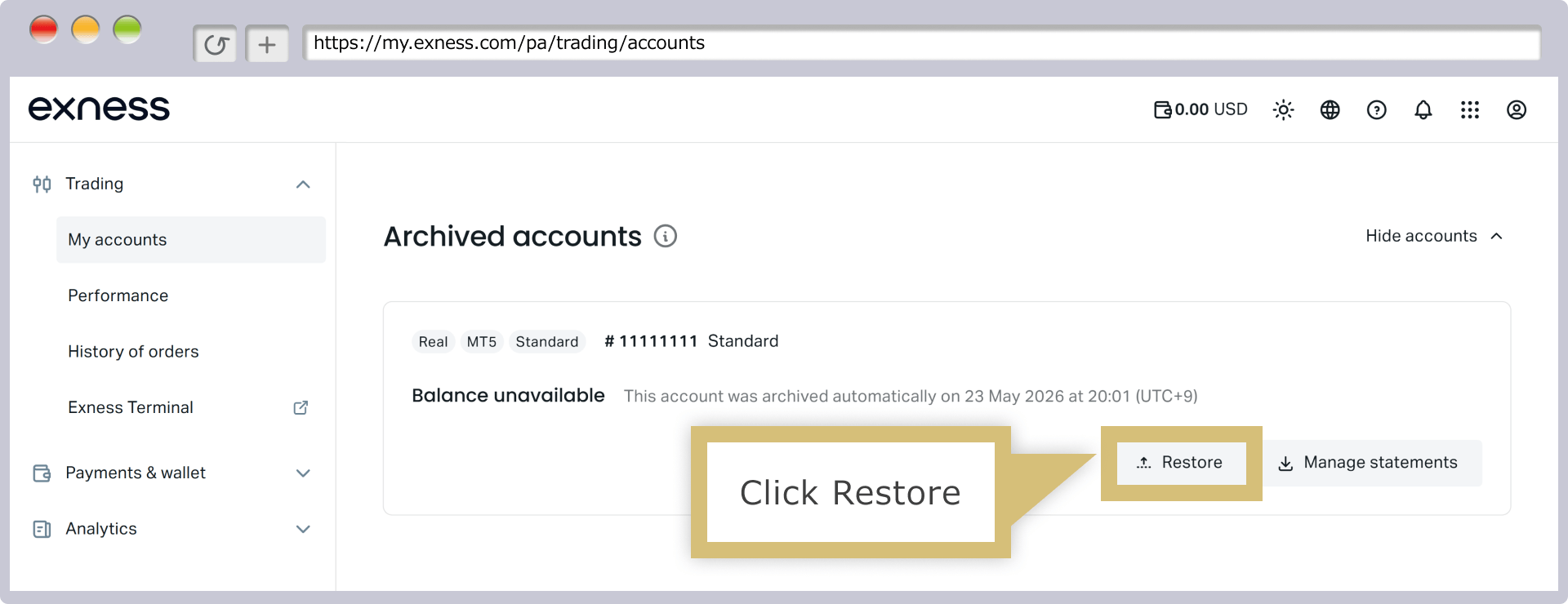
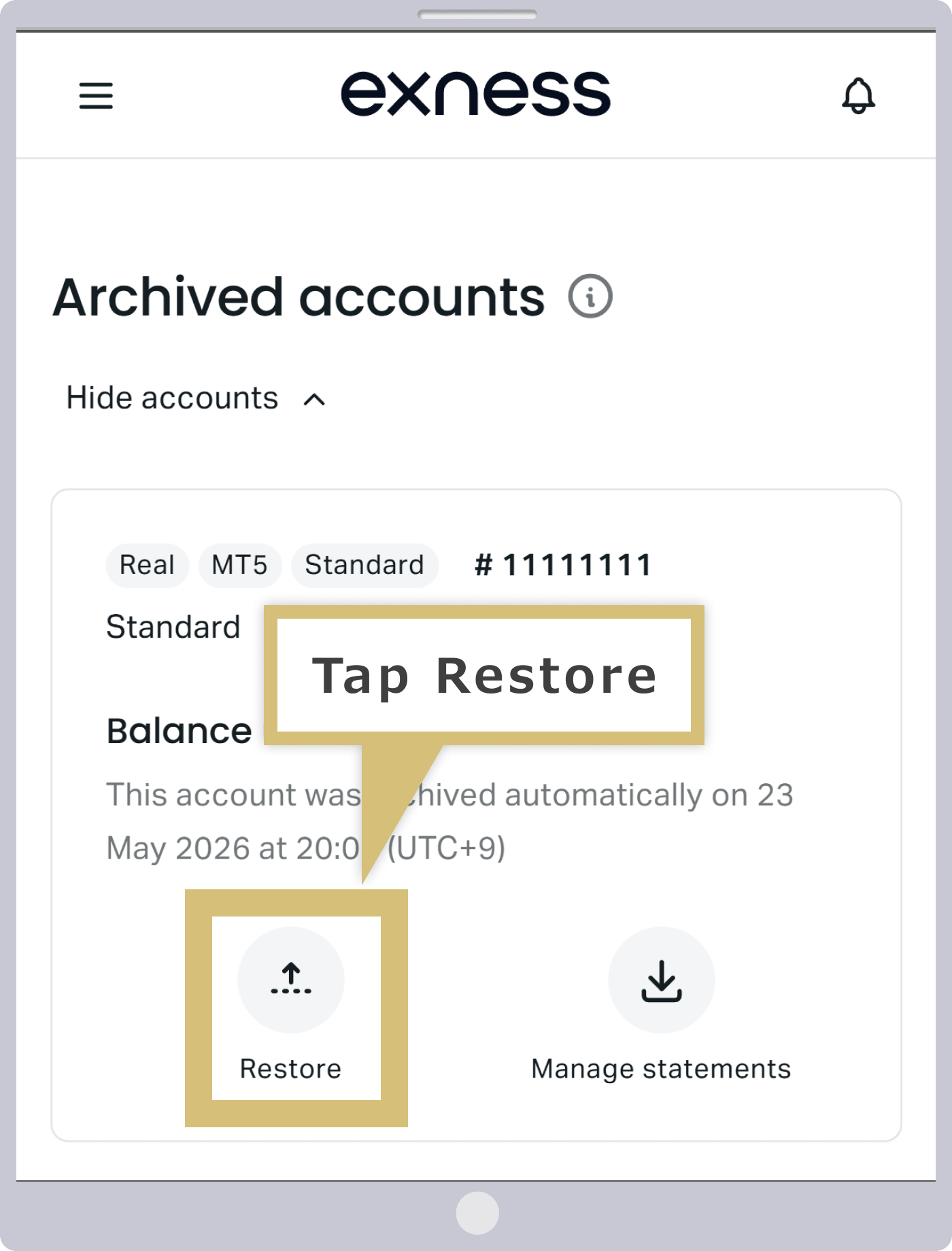
Please note that to withdraw funds remaining in an archived (dormant) account, you must first reactivate the account before proceeding with the withdrawal. In the “Archived Accounts” section of your Personal Area, click “Reactivate” next to the account you wish to reactivate, and the account will be reactivated immediately.
Please note that to withdraw funds remaining in an archived (dormant) account, you must first reactivate the account before proceeding with the withdrawal. To reactivate an account, go to “Archived Accounts” in your Personal Area, select the account you wish to reactivate, and tap “Reactivate.” The account will be reactivated immediately.
Archived accounts are also counted toward the total number of accounts held.
At Exness, you can hold up to 200 live trading accounts per account. Additionally, there is a limit of 100 accounts each on MT4 and MT5 (for Standard Cent accounts, the limit is 10 accounts each on MT4 and MT5, for a total of 20 accounts).While Exness allows you to hold a very large number of accounts, this total includes archived accounts. Please note that while you can reactivate archived accounts, you cannot delete them.

At Exness, you can create and use multiple Personal Areas. While you cannot create multiple Personal Areas using a single email address, you can create a new Personal Area using a different email address. Please note that you can use the same phone number and the same documents for profile verification across multiple Personal Areas.
Exness: Frequently Asked Questions (FAQ) About Opening Additional Accounts
-
Does Exness count archived accounts toward the total number of accounts held?
Yes, at Exness, archived accounts are also counted toward your total number of accounts. You may hold up to 200 live trading accounts per account, and accounts that have been archived (dormant) are included in this count. It is possible to reactivate an archived account, but you cannot delete it.
Read More
26.01.2024
-
Does Exness automatically delete trading accounts that are no longer in use?
No, Exness does not automatically delete accounts. Accounts that have not been used for a certain period of time are automatically archived (dormant accounts) and moved to the “Archived” section of the Personal Area. To withdraw funds from an archived account, you must reactivate it.
Read More
26.01.2024
-
Do I need to submit any new documents when opening an additional account with Exness?
No, you do not need to submit new identification documents when opening an additional account with Exness. However, you can only open an additional account if the identity verification for your main trading account has been completed. If your main trading account has not been verified, please submit your identification and proof-of-address documents to complete the verification process.
Read More
26.01.2024
-
Is it possible to engage in hedging using additional accounts at Exness?
Yes, at Exness, you can engage in hedging across multiple accounts—a practice that is prohibited by many FX brokers. Exness places no restrictions whatsoever on hedging, and since you can use multiple accounts to hedge your positions, this expands your trading options. Please feel free to use multiple accounts with confidence.
Read More
26.01.2024
-
How many additional accounts can I open with Exness?
At Exness, you can hold up to 200 live trading accounts per account (100 MT4 accounts and 100 MT5 accounts).However, to reduce server load, the maximum number of accounts that can be opened per account type is limited to 100 (10 MT4 accounts and 10 MT5 accounts for Standard Cent accounts).
Read More
26.01.2024