To withdraw funds from your Exness trading account to STICPAY, log in to your Personal Area, select "Withdrawal" from the menu, and follow the instructions.
You can withdraw funds deposited via STICPAY as well as profits generated from trading. There are no withdrawal fees, and funds will be credited to your STICPAY account immediately upon completion of the process.
Please note that at Exness, you must complete all profile verification (identity verification) procedures before initiating a withdrawal.
For anti-money laundering purposes, Exness requires that withdrawals be made using the same payment method used for deposits. If you used multiple payment systems to make a deposit, please follow the payment system priority order established by Exness: first complete the withdrawal process to a credit/debit card or Bitcoin, and then proceed with the withdrawal via STICPAY.
The steps for withdrawing funds from your Exness trading account to STICPAY are as follows:
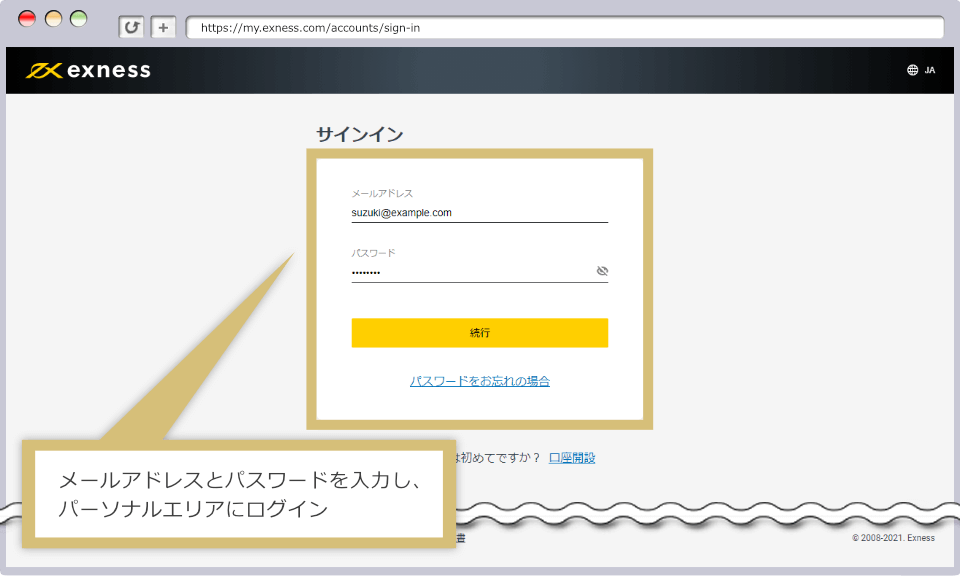
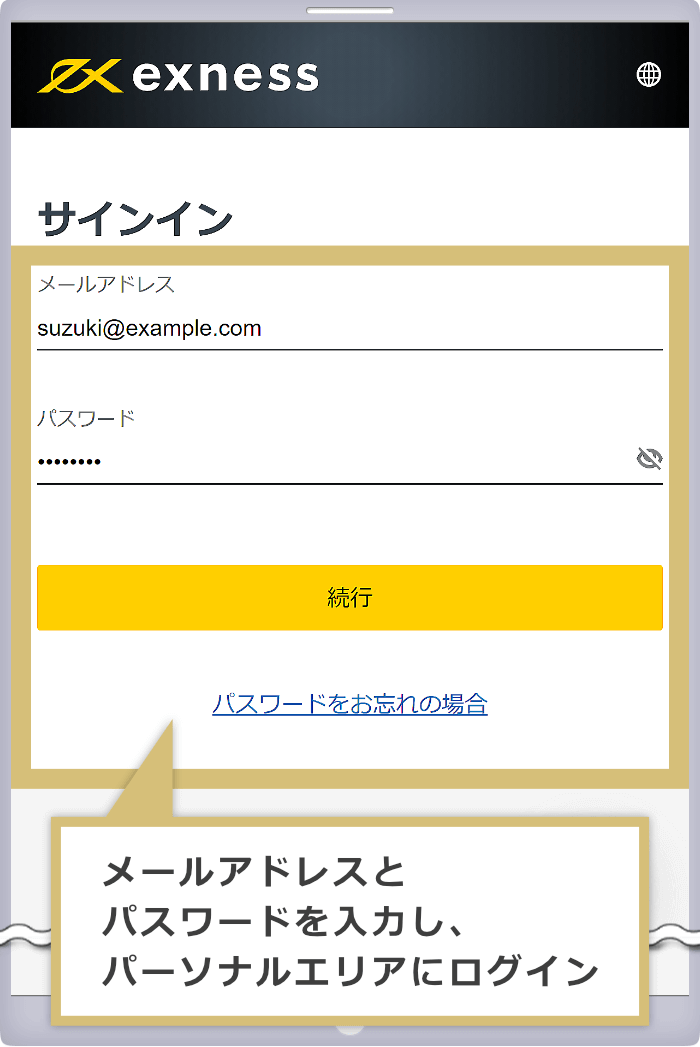
Enter the email address you used to register with Exness and your Personal Area login password to log in to the Exness Personal Area.
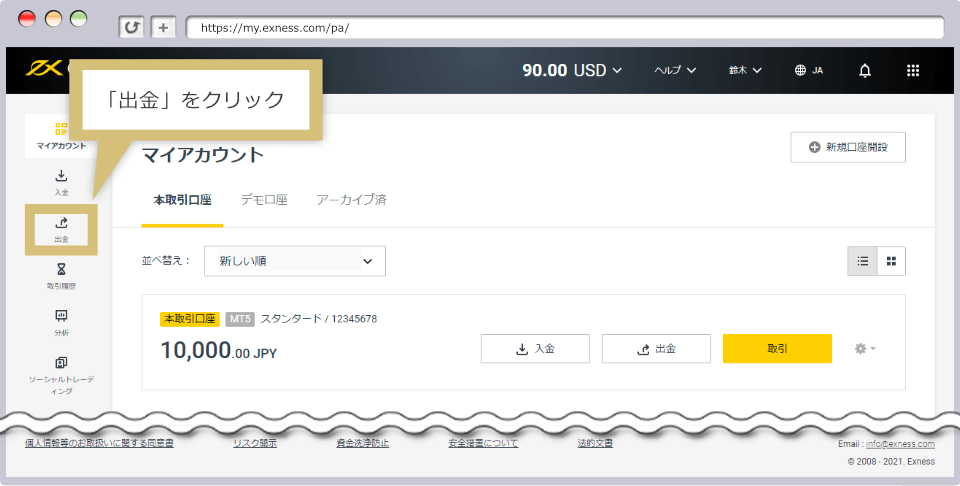
In the menu list on the left side of the Personal Area, click "Withdrawal."
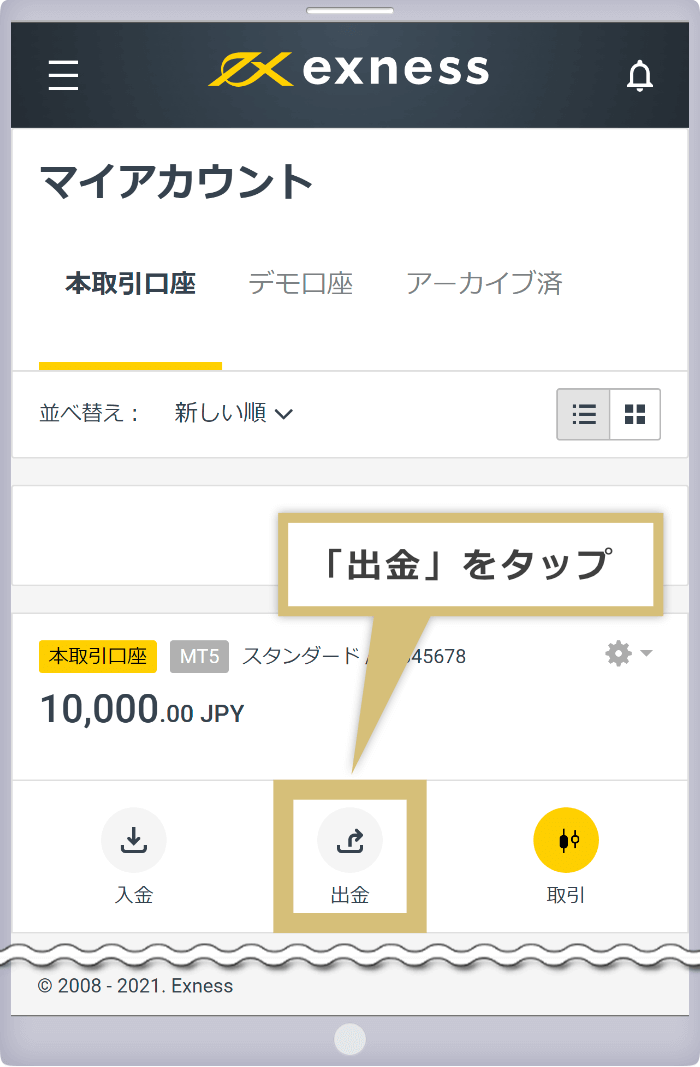
Tap "Withdraw" in the "Live Trading Account" section of the My Account page.
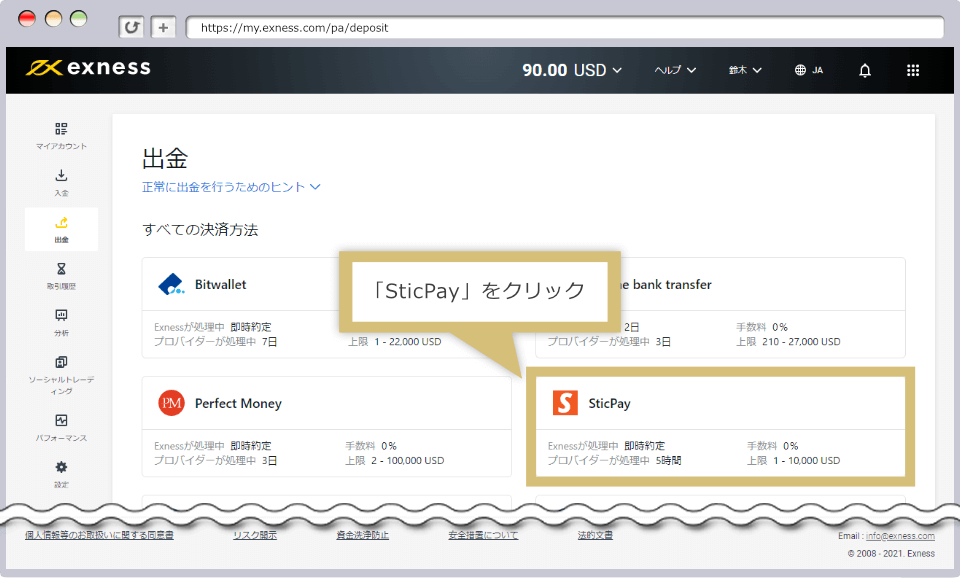
You will see a list of withdrawal methods available on Exness; click "SticPay" under "All Payment Methods" in the list.
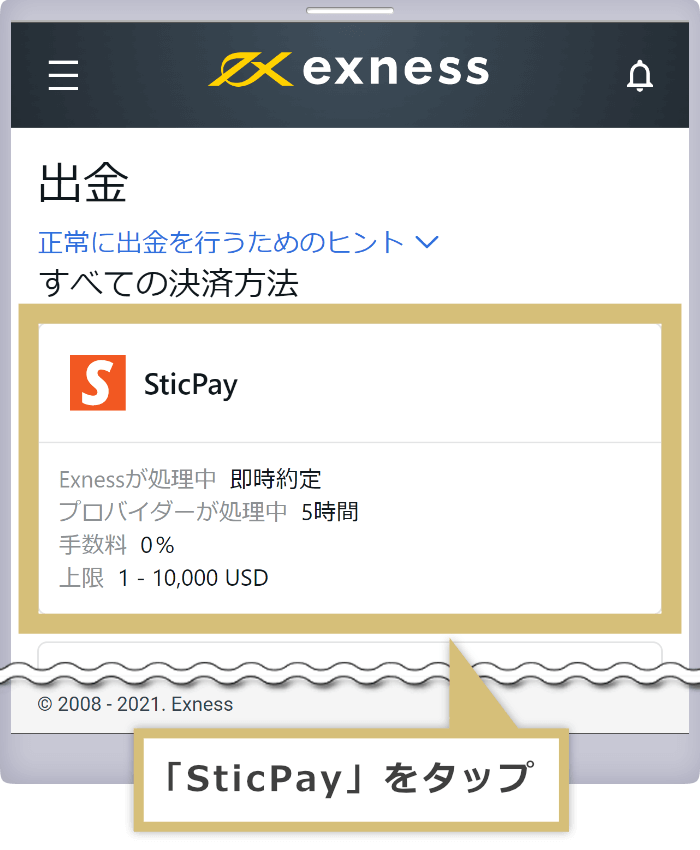
You will see a list of withdrawal methods available on Exness; tap "SticPay" under "All Payment Methods" in the list.
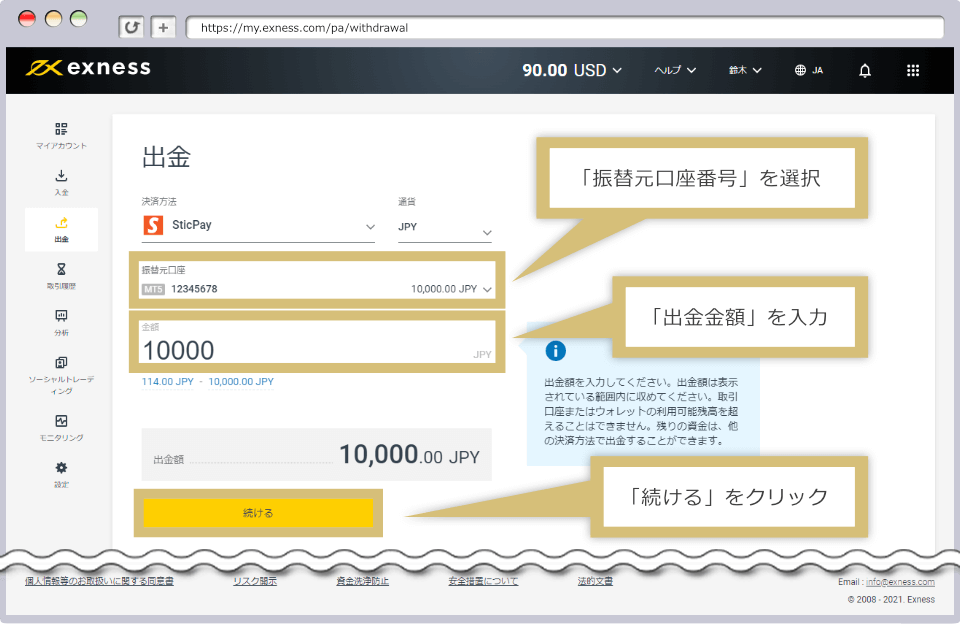
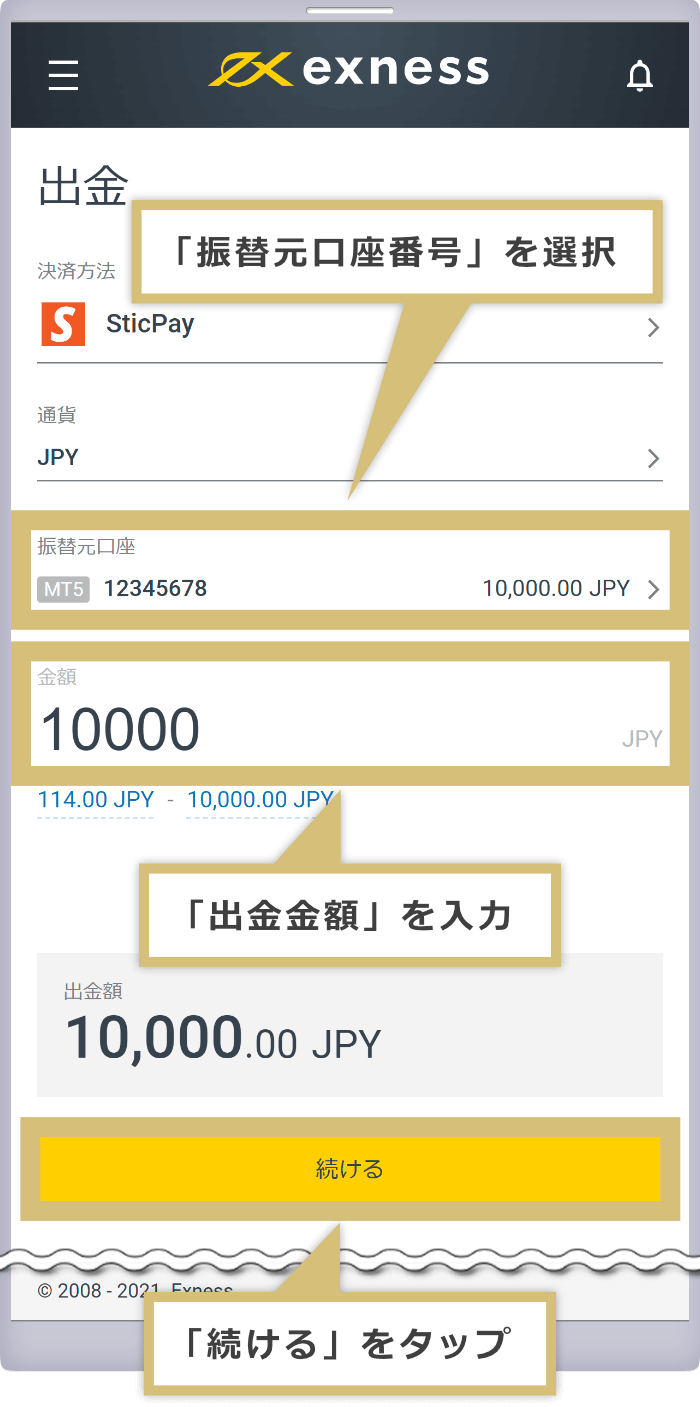
Select the "Transfer Source Account," enter the "Amount," and click "Continue."
Select the "Transfer Source Account," enter the "Amount," and tap "Continue."
The amount available for withdrawal (the deposited amount plus any profits) will be displayed below the amount field.

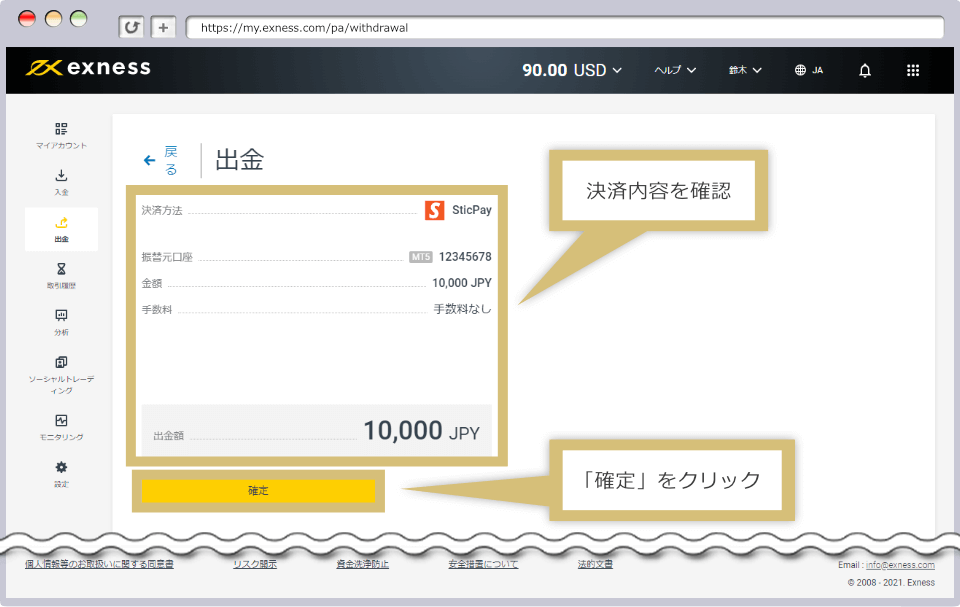
The details of your withdrawal from Exness to STICPAY will be displayed. Please verify that the information is correct and click "Confirm."
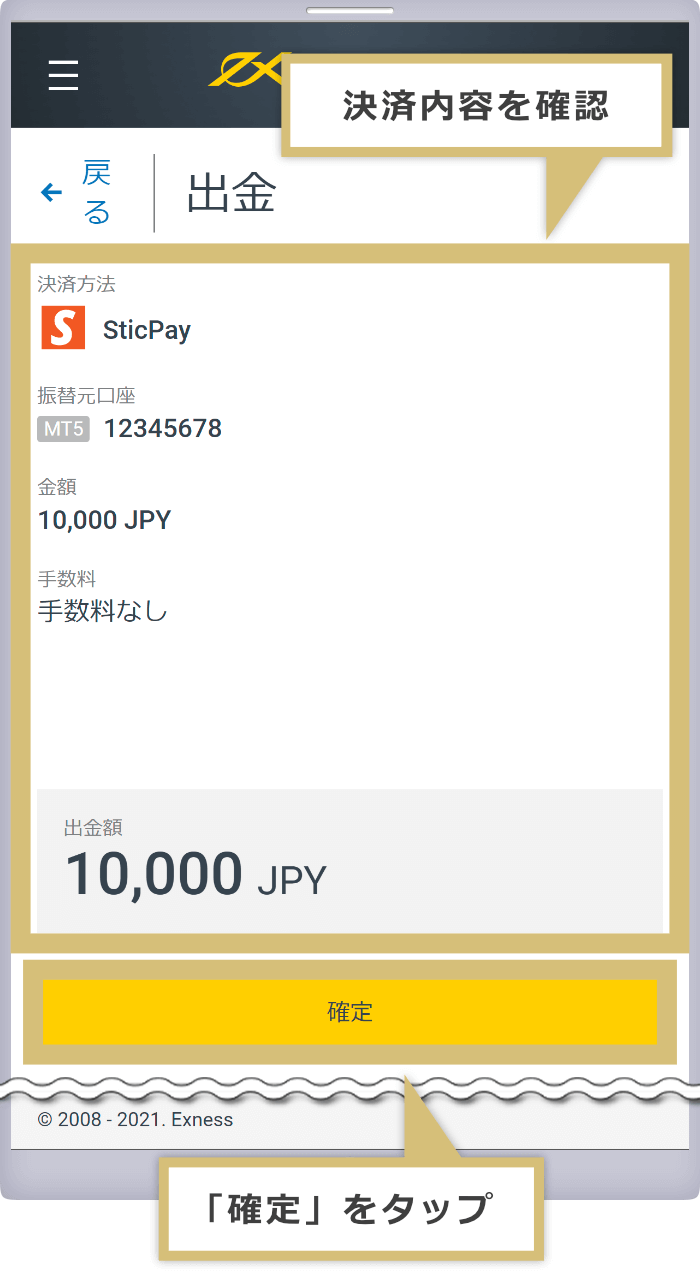
The details of your withdrawal from Exness to STICPAY will be displayed. Check that the information is correct, then tap "Confirm."
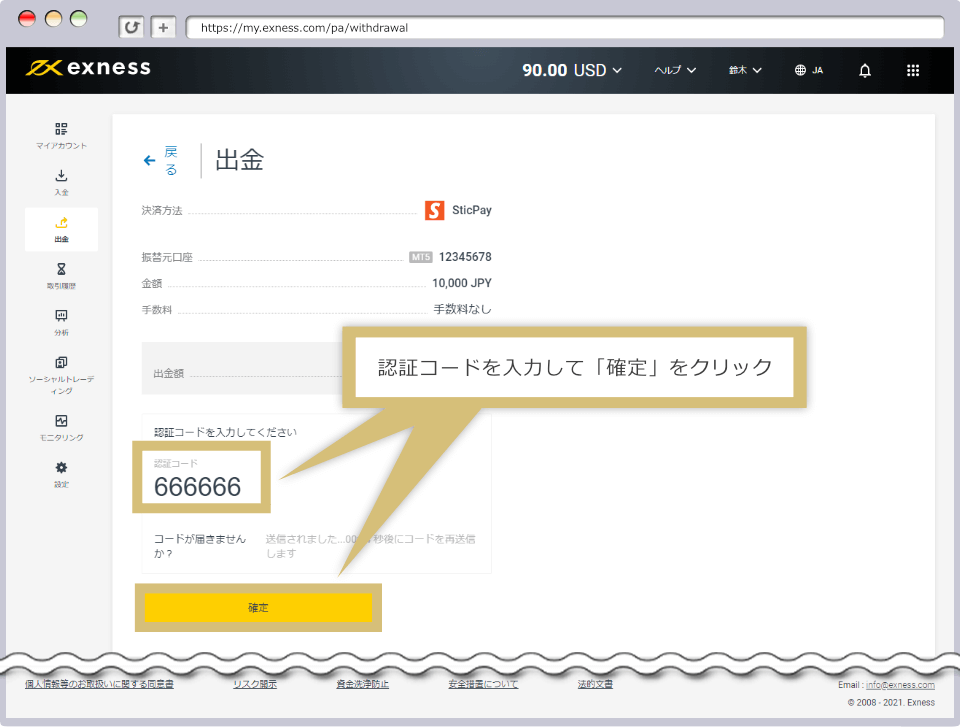
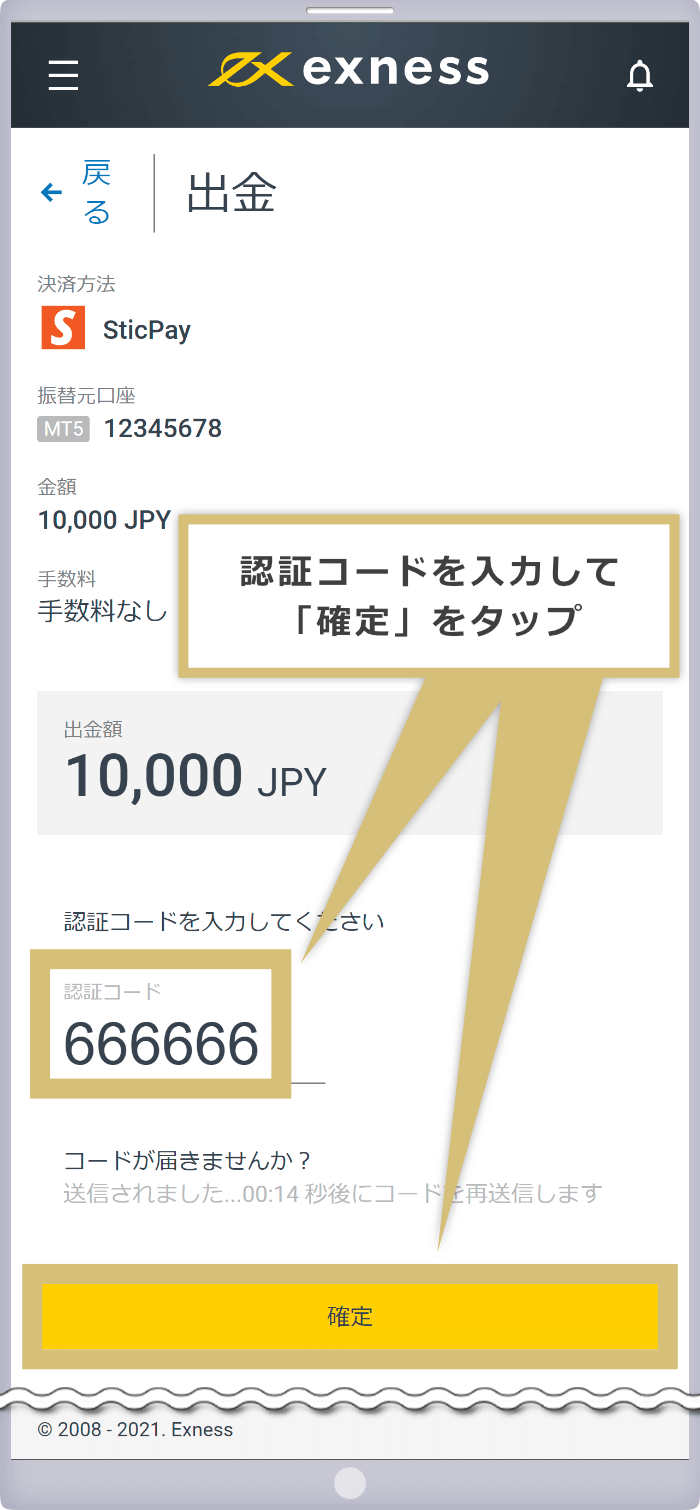
The "Verification Code" field will appear. Please enter the 6-digit verification code you received via the two-factor authentication method set up in STICPAY within 60 seconds, then click "Confirm."
The "Verification Code" field will appear. Enter the 6-digit verification code you received via the two-factor authentication method set up in STICPAY within 60 seconds, then tap "Confirm."
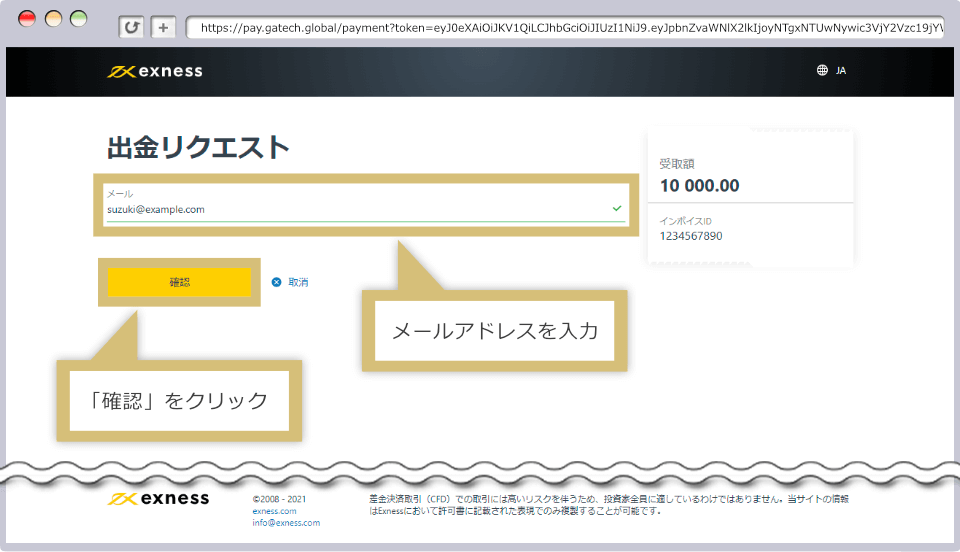
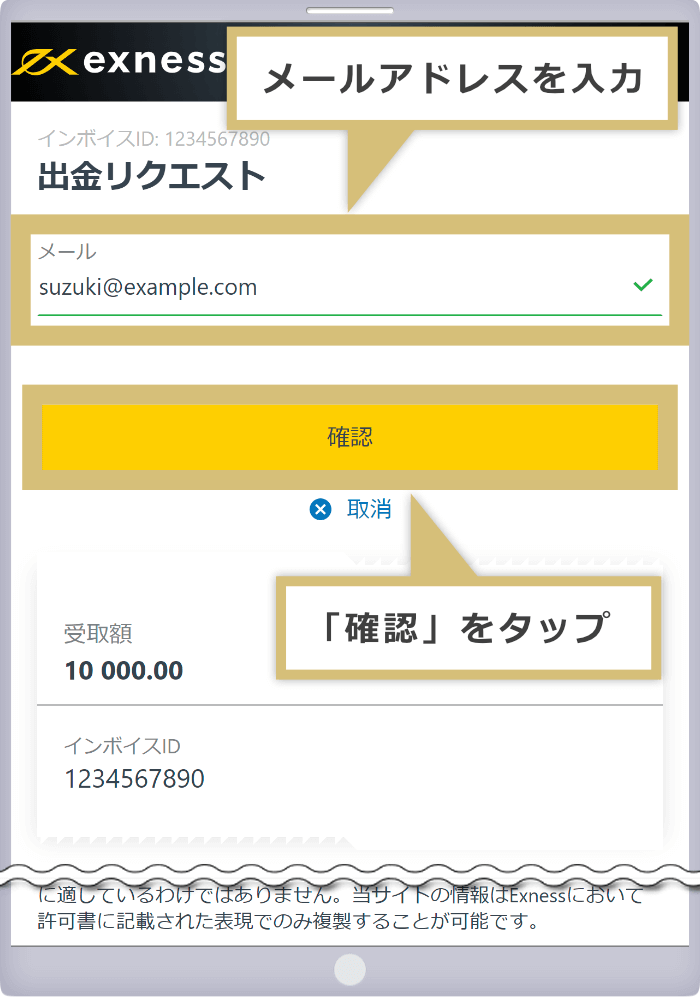
The withdrawal request page will appear. Enter the email address you used to register with STICPAY in the "Email" field, then click "Confirm."
The withdrawal request page will appear. Enter the email address you used to register with STICPAY in the "Email" field, then tap "Confirm."
A message saying "Request is being processed..." will appear. Please click "Go to Merchant."
A message saying "Request is being processed..." will appear. Please tap "Go to Merchant."
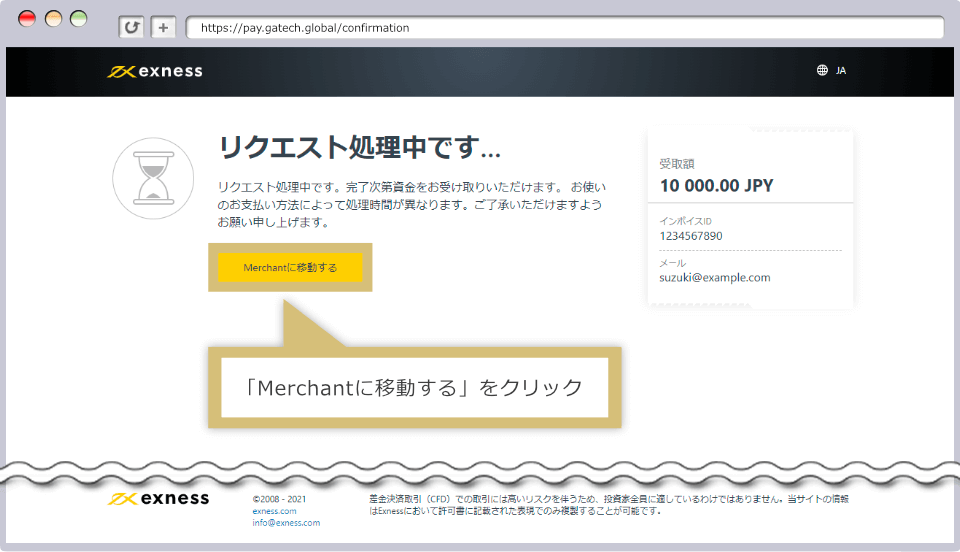
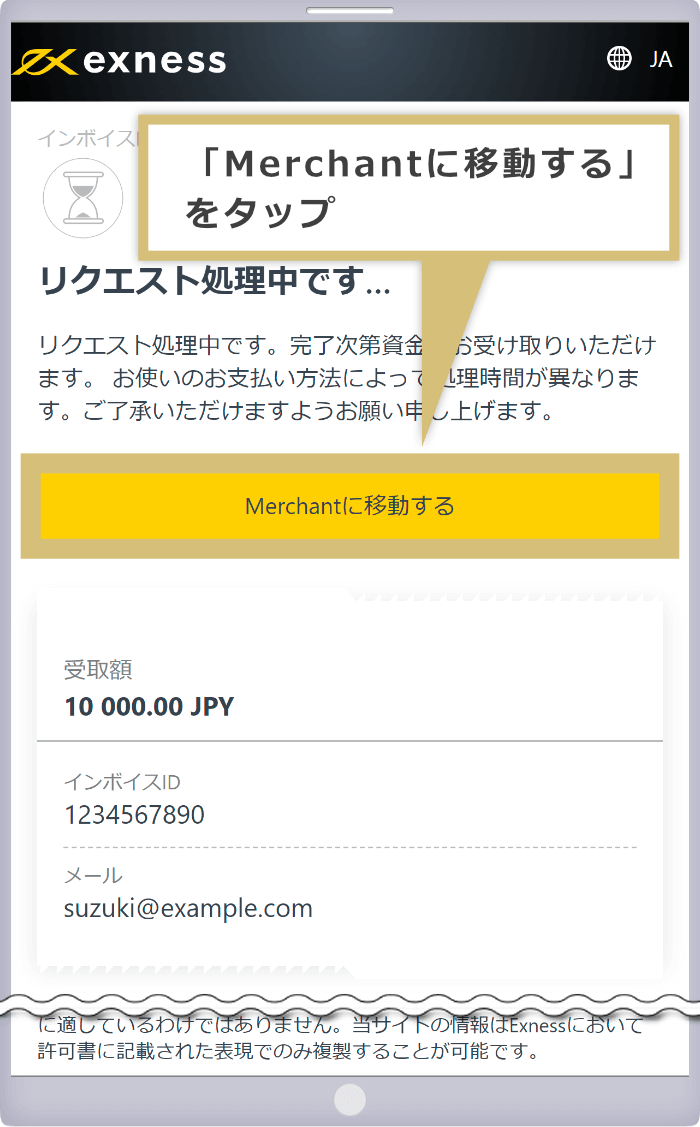
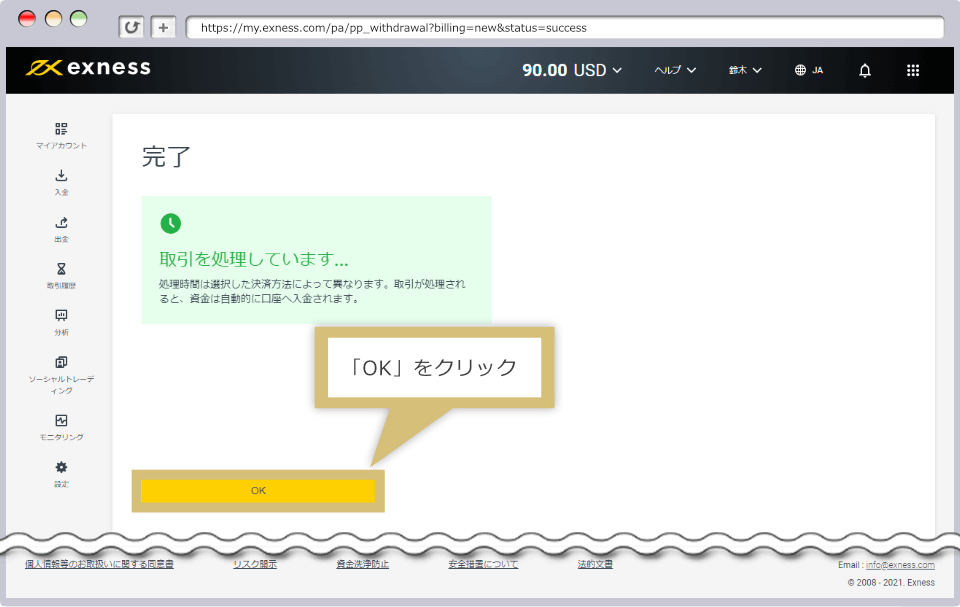
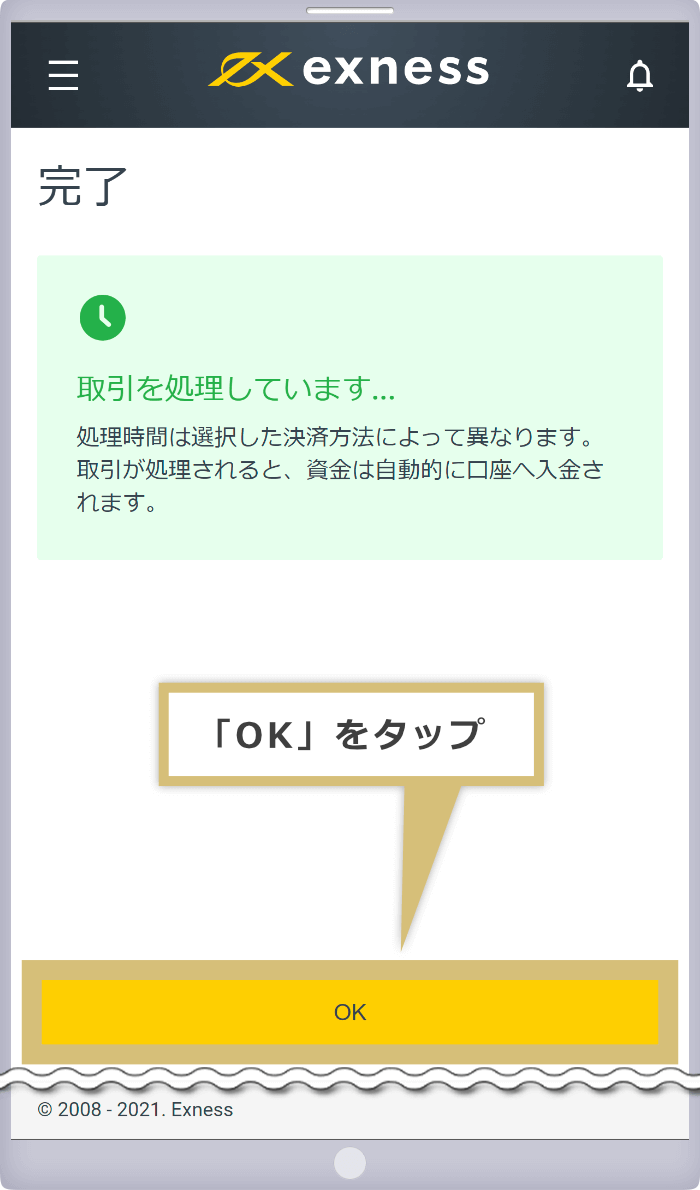
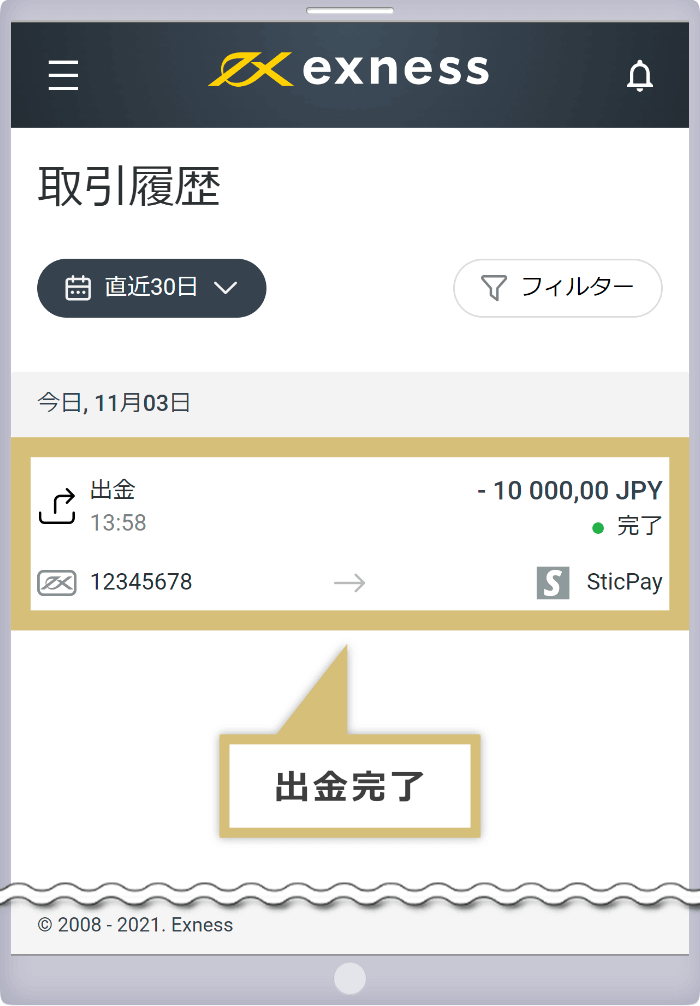
Once the withdrawal from your Exness trading account to STICPAY is successfully completed, a message stating "Your transaction is being processed" will appear, indicating that the withdrawal process is complete.
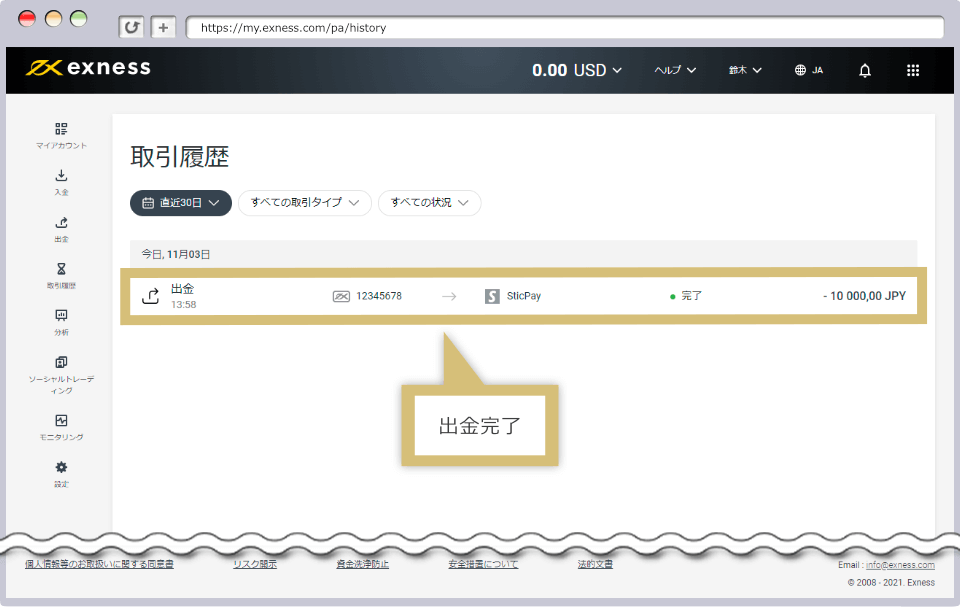
Your Exness trading history will be displayed; please verify that funds have been withdrawn from your Exness trading account to STICPAY.
Is it possible to withdraw funds from Exness to a STICPAY account that is different from the one used for deposits?
No, Exness does not allow withdrawals to a STICPAY account different from the one used for the deposit. Please process your withdrawal to the STICPAY account you used for the deposit. Please note that you must select the same currency for the withdrawal as the one used for the deposit.
Read more
09.11.2021
Can I withdraw my profits from Exness to STICPAY?
Yes, if you have a deposit history with Exness using STICPAY, you can withdraw your profits to STICPAY. However, please note that if you have used multiple deposit methods, there are restrictions on the amount you can withdraw based on the priority of withdrawal methods and the proportion of each deposit amount.
Read more
09.11.2021
I can't withdraw funds from Exness to STICPAY.
At Exness, if you have a deposit history using multiple methods, we prioritize withdrawal methods, with credit/debit cards and Bitcoin given the highest priority. Once each withdrawal is processed, you can withdraw funds to STICPAY.
Read more
09.11.2021
Can I withdraw funds to STICPAY even if I don’t have a deposit history with STICPAY on Exness?
No, you can only withdraw funds from Exness to STICPAY if you have a deposit history with STICPAY. Due to anti-money laundering regulations, Exness requires that withdrawals be made using the same payment method used for deposits.
Read more
09.11.2021
Is there a withdrawal limit when withdrawing funds from Exness to STICPAY?
Yes, when withdrawing funds from Exness to STICPAY, the minimum withdrawal amount per transaction is the equivalent of 1 USD, and the maximum limit is the equivalent of 10,000 USD. If you wish to withdraw an amount exceeding the per-transaction limit, please split the withdrawal into multiple transactions, as there is no overall limit on the total withdrawal amount.
Read more
09.11.2021


If you're using iOS

If you're using iOS, tap the "Add to Home Screen" icon at the bottom of Safari and select "Add to Home Screen." Once you've added it to your Home Screen, you can turn on "Receive Push Notifications" as shown above.
If you are using an Android device or a PC
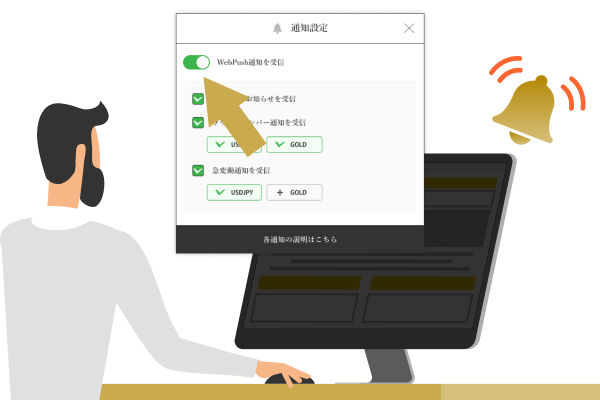
If you're using an Android device or a PC, you can simply turn on "Receive push notifications" above without installing the app. (If your browser asks for permission, please select "Allow.")
You can find instructions on how to add this to your smartphone's home screen below.


You will receive notifications about key metrics and limited-time promotions. If you turn this feature off, you may not be able to participate in limited-time promotions.
A feature that sends notifications when a price reaches a round number. These notifications help traders capitalize on trading opportunities and manage risk, making them a popular tool among many traders.

Notifications are sent for every 100 pips (1 JPY) (e.g., $1 = 147 JPY, $1 = 148 JPY, etc.). Notifications for the same exchange rate are reset after 3 days (72 hours).
Notifications are sent every 500 pips (50 USD) (e.g., $3,000, $3,050, etc.). Notifications for the same rate are reset after 3 days (72 hours) have passed.
Notifications are sent every $5,000 (e.g., $110,000, $115,000, etc.). Notifications at the same rate are reset after 3 days (72 hours).
Receive real-time notifications of price fluctuations for USD/JPY, gold, and Bitcoin. Never miss a trading opportunity, even when you’re on the go, and place orders instantly in response to market conditions.
You will receive a notification when there is a price fluctuation of 30 pips (0.3 JPY) or more within 10 minutes (sharp rise or fall). After that, notifications for sudden price fluctuations under the same conditions will be paused for one hour.
Receive a notification when the price fluctuates by more than $20 within an hour (sharp rise or fall). After that, notifications for sudden price fluctuations under the same conditions will be paused for 4 hours.
Receive a notification when the price fluctuates by more than $2,000 within an hour (sharp rise or fall). After that, notifications for sudden price fluctuations under the same conditions will be paused for 4 hours.